Delegate to DeepSeek Harness From Anywhere: the New AgentRQ Plugin
Here's the workflow this plugin is built for: you're away from your desk, an idea hits you, and you open AgentRQ on your phone and assign a task to your workspace's agent. Back at your desk, your DeepSeek Harness session — already running, already mid-conversation on something else — picks up that task on its own, works it, and reports back through reply. You never touched the harness to hand it the work, and it never had to ask you for it.
That's the new @agentrq/dsh-plugin-agentrq plugin: an AgentRQ task manager for DeepSeek Harness, published to npm and installable in one command.
Push, Not Poll
The core design decision is right there in the plugin's runtime: it never asks AgentRQ if there's work. AgentRQ already knows when there's work and pushes it:
- → creating a task assigned to the agent pushes it immediately from the backend the moment it's created;
- → a background poller re-pushes the next unclaimed task — or a status check on the ongoing one — every 60 seconds, over the same
notifications/claude/channelmechanism the Claude Code and Gemini/ACP integrations already use.
The plugin's own workspace session just subscribes to that channel. If it polled the queue on its own schedule too, every task would get delivered twice — once from the server's ticker, once from the client's. So it doesn't: one source of truth, one delivery path.
Each push is forwarded as written. A new task assignment, the periodic reminder, a status check, and a human's reply all arrive on the same channel, and the plugin doesn't try to guess which kind it's looking at — it just frames the content (naming the chat_id and which tools to answer with) and hands it to the agent. Trying to classify the push would only add a way to be wrong.
Where it lands depends on what the agent is doing: inject() while a turn is running, so the content arrives at the next step boundary without interrupting anything in flight, or followup() while idle, since nothing else would wake it up.
Repeats Are Dropped, Not Re-Delivered
Because AgentRQ's poller re-pushes an unclaimed task every 60 seconds, a naive forwarder would nag the agent once a minute for the same task. The plugin keeps a bounded, recent set of (task, content) pairs — capped at 200 entries — and silently drops anything it's already delivered. A genuinely new message on the same task still gets through; only byte-identical repeats are suppressed.
Staying connected is what makes any of this work, so the session reconnects with exponential backoff (starting at 1 second, capped at 15 minutes by default) on top of the MCP SDK's own SSE resumption. Since the server re-pushes on its own schedule anyway, a session that drops and reconnects just catches up on the next tick — no client-side replay logic needed. A catchUpOnStart check also dequeues one task the moment the session opens, so work that was assigned before you started the harness doesn't sit around waiting for the next 60-second tick.
What the Model Actually Gets
The bundle mounts two things into your DeepSeek Harness profile. First, @deepseek-ai/dsh-mcp-client — the MCP bridge the harness already ships — bridging the workspace's tools to the model under the agentrq namespace:
| Tool | Purpose |
|---|---|
mcp__agentrq__getTask |
Fetch a task, or dequeue the next one assigned to this agent |
mcp__agentrq__createTask |
Assign work to the human or to another agent |
mcp__agentrq__updateTaskStatus |
Move a task to ongoing, completed, blocked, … |
mcp__agentrq__reply |
Send a message into a task thread — the only thing the remote human sees |
mcp__agentrq__getWorkspace |
Read the workspace title and mission |
mcp__agentrq__downloadAttachment |
Fetch an attachment's content |
mcp__agentrq__publishEvent |
Fire a named event so subscriber workspaces spawn their trigger tasks |
Second, one tool the plugin owns directly: agentrq_autopull, for status, pause, resume, or pull_now from inside the harness. pull_now is the one case that doesn't go through the push pipeline — it returns the dequeued task as the tool call's own result, since a tool body runs mid-turn by definition.
The Part a Tool Bridge Can't Do on Its Own
Bridging tools isn't the whole job. AgentRQ's MCP server ships its collaboration rules as server-level Instructions — the same protocol Claude Code and Gemini pick up automatically. DeepSeek Harness doesn't surface an MCP server's Instructions to the model, so without something else, the model would have the tools but not the contract behind them: that the human is remote, sees only what reply sends, and expects the task claimed with updateTaskStatus before work starts.
So the plugin contributes that contract itself, as a system-prompt section:
Every tool name in that section is generated from the bridge's configured namespace rather than hardcoded, so if you rename the bridge, the guidance and the actual registered tools can't drift out of sync with each other.
One Profile Per Workspace
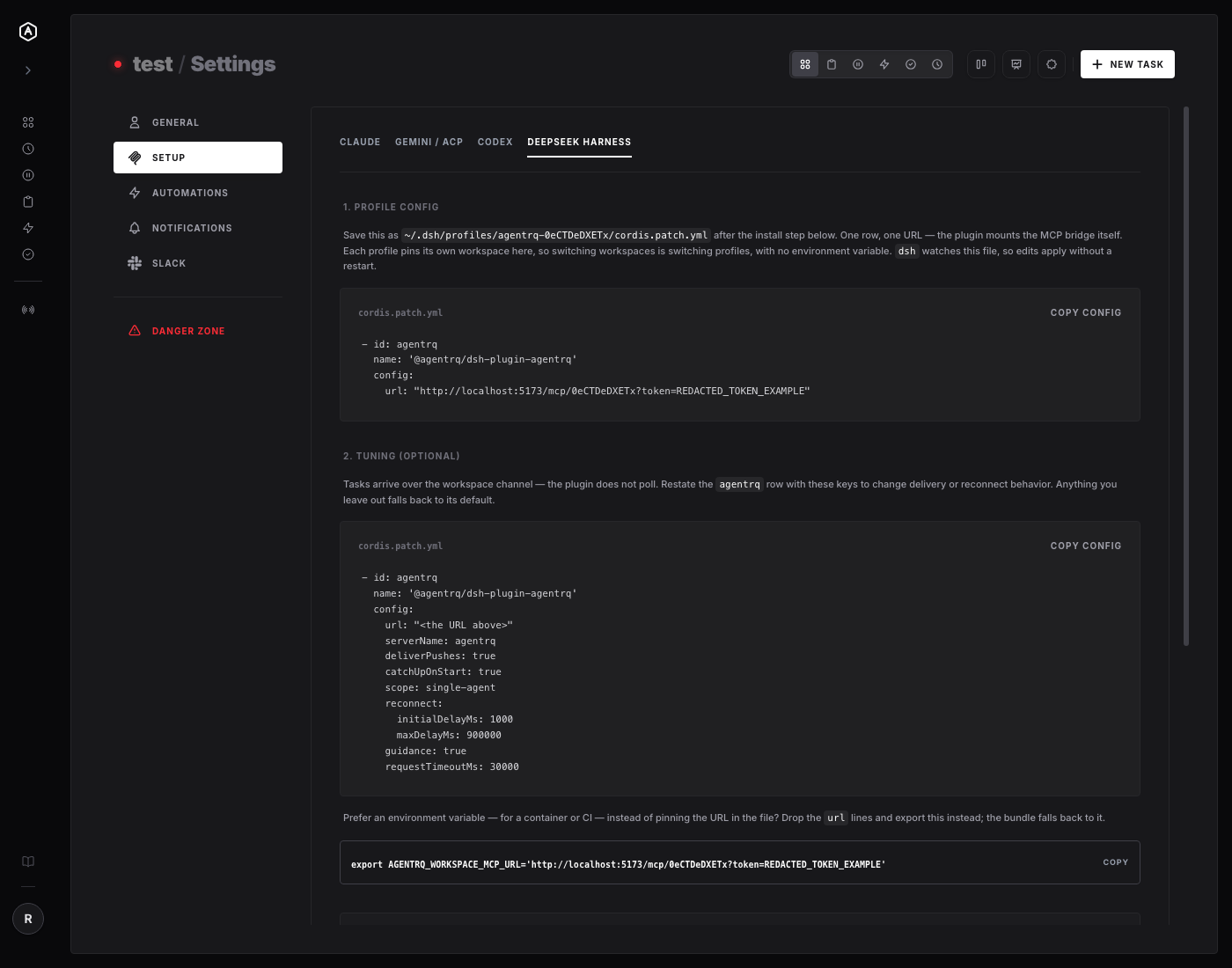
AgentRQ users typically run several workspaces — different repos, different missions, different agent identities. The plugin's answer is architectural, not a config flag: each DeepSeek Harness profile serves exactly one workspace, with the endpoint pinned in that profile's own cordis.patch.yml. Switching workspaces means switching profiles — there's no shared environment variable to mis-set and accidentally point one workspace's session at another's task queue.
Your workspace's Settings → Setup → DeepSeek Harness tab — new, sitting right beside Claude, Gemini/ACP, and Codex — prints the install command and the cordis.patch.yml block with your workspace's endpoint and token already filled in, ready to copy. For container or CI use where pinning a URL into a file isn't convenient, both bundle rows also fall back to reading AGENTRQ_WORKSPACE_MCP_URL from the environment.
By default, scope: single-agent means exactly one live root agent holds the workspace session — the harness's web UI creates a root agent per chat session, so without this, opening three tabs would get every task delivered three times. Set scope: every-agent if your setup genuinely wants that fan-out.
Getting It
Then pin the endpoint from your workspace's Settings page into ~/.dsh/profiles/agentrq-<workspace>/cordis.patch.yml, and start the harness against that profile. dsh watches the patch file, so a later change to the endpoint or any tuning key takes effect without a restart.
The package ships from plugins/deepseek-harness in the main AgentRQ repo, with its own CI workflow that typechecks, tests, and builds on every PR touching that path, and publishes to npm via npm trusted publishing — no long-lived npm token stored anywhere — whenever a version bump lands on main.
If you're already running DeepSeek Harness and AgentRQ side by side, this closes the loop: assign work from wherever you are, and let the harness pick it up the moment it's free.
---
AgentRQ is currently in public beta. Join our GitHub community to help shape the future of human-agent collaboration.