Workflows: Turning Scattered Event Triggers Into a Pipeline You Can See
Multi-step automation across workspaces has been possible in AgentRQ for a while. It just wasn't visible.
Event triggers are global: subscribing a workspace to an event means it fires for every publish of that event, everywhere. Chain a few of those together — code changes, docs get updated, a blog post gets drafted, the announcement goes out — and you have a working pipeline that exists nowhere as an artifact. There was no page called "this pipeline." Just triggers scattered across events, and the only way to understand the chain was to open each event and read its triggers one at a time, holding the graph in your head.
AgentRQ v0.4.0 gives that graph a name, a page, and an execution scope. It's called a workflow.
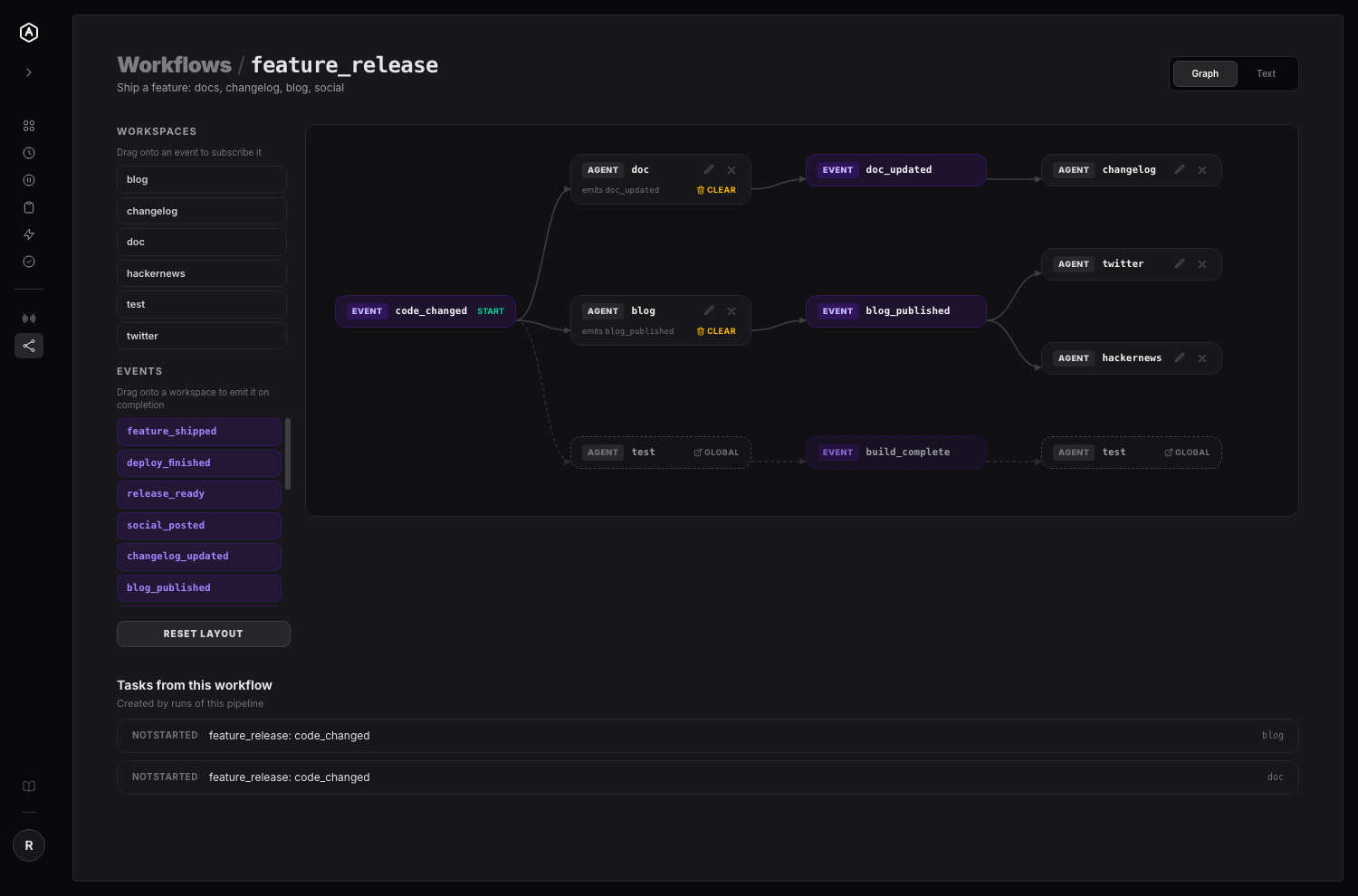
What a Workflow Actually Is
A workflow is a named, isolated subgraph of the events system. It has a start event and a set of steps, where each step does two things:
- Subscribes a workspace to an event — when that event fires, this workspace gets a task.
- Optionally emits another event when that task completes, which carries the chain onward.
That's the whole model. There are no conditionals, no branching logic to configure — an event is consumed by workspaces, and each of those may publish one event in turn. The alternation is the structure.
The important word is isolated. Publishing into a workflow runs only that workflow's steps. You can build a five-stage pipeline, run it end to end, break it, and fix it, without any of that firing for unrelated publishes of the same event elsewhere in your account. Before this, "let me just test this chain" and "let me trigger this for everyone subscribed" were the same action.
Two Ways to Build the Same Graph
Some people think in boxes and arrows. Some would rather type the thing and be done. Both edit the same underlying graph, and you can switch between them mid-edit.
The canvas is drag-and-drop, with two gestures that cover the whole model:
- → Drag a workspace onto an event → that workspace is now subscribed to it.
- → Drag an event onto a workspace → that workspace now emits it on completion.
Nodes auto-place in alternating columns (event, workspaces, event, …) so the graph is readable before anyone arranges anything. Drag a node and it stays where you put it; Reset Layout hands it back to the automatic placement.
The text editor is an indentation format — two spaces per level, every line either - agent:name or - event:name:
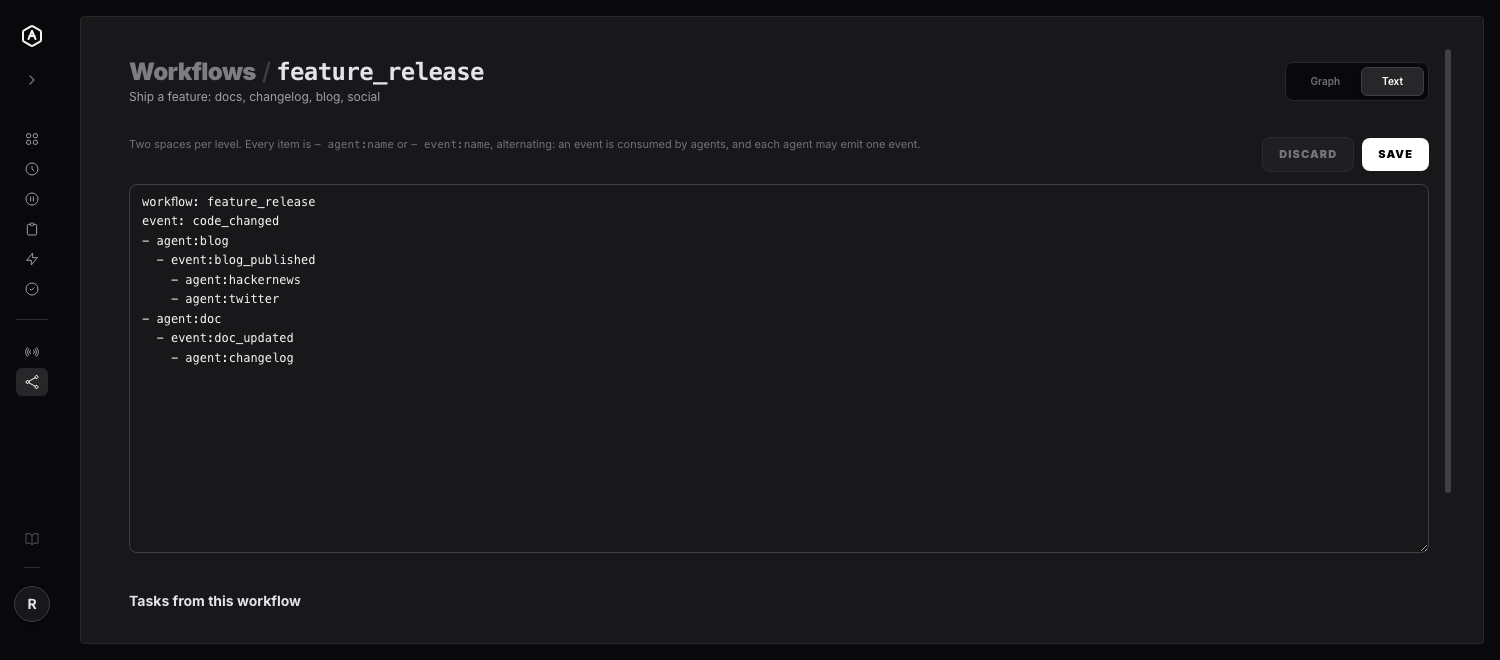
That's the same pipeline as the canvas screenshot above. A line's meaning never depends on its depth — the agent: / event: prefix is always required, so a missing prefix is a reported error rather than a silent reinterpretation. Errors come back with the line number so the editor can mark the row you actually typed.
Running One: No New Tool to Learn
Agents start a run through the publishEvent tool they already have, by naming the workflow:
Every workspace subscribed to that event within the workflow gets its task, and each task records the workflow it belongs to — so a run is reviewable after the fact, listed on the workflow's own page rather than reconstructed from timestamps across five workspace boards.
Onward chaining is handled the same way it always has been: a step that emits an event gets that instruction appended to the task body it creates, so the agent finishing the blog task sees [On completion: call publishEvent("blog_published", "<your output payload>")] and carries the chain to the next stage.
Cycles Get Rejected at Save Time
A pipeline that loops back on itself is a runaway loop with a task-creation budget. Workflow steps are validated as a graph when you save, so you find out at the editor rather than in production:
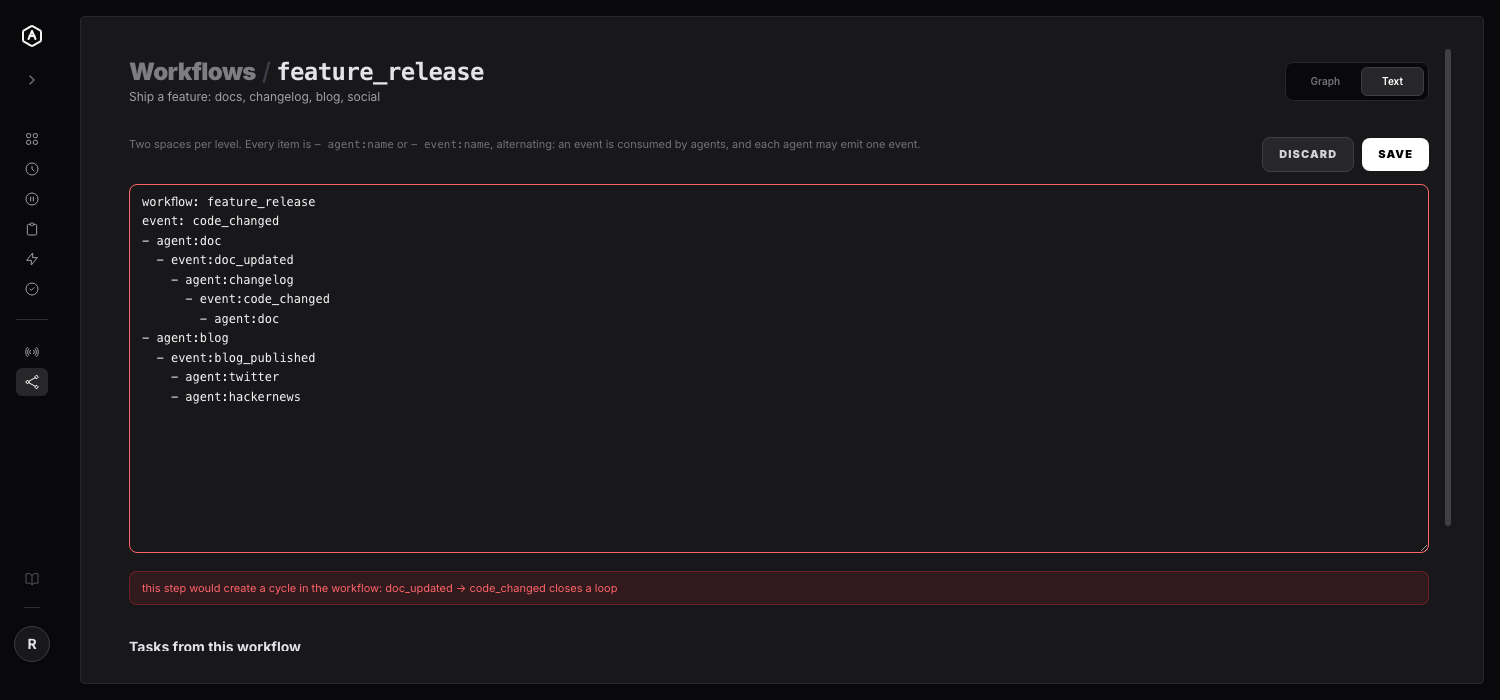
The error names the edge that closes the loop — doc_updated -> code_changed — instead of just refusing.
Agent-to-Agent Coordination Without if/else — and Without Endless Chatter
The missing conditionals are the most deliberate thing about this format, and the part worth dwelling on if you've ever tried to get two agents to hand work to each other.
Branches are event names, not if statements. An agent doesn't ask "should the blog step run?" — it decides what happened and publishes the event that says so. If docs came out clean it publishes doc_updated; if the build broke it publishes build_failed. Different name, different subscribers, same one-line tool call. The decision stays where the information is (the agent that just did the work), and the routing stays where it's reviewable (the graph). Nobody maintains a branch in two places, and nobody has to keep a rulebook of every downstream consumer in a system prompt.
Publishers don't know their consumers. A step names an event, not a workspace. Adding a second consumer — say, hackernews alongside twitter — is a drag on the canvas, not a prompt edit in the upstream agent. That's the difference between wiring and negotiation: you can grow a pipeline without touching the agents already in it.
Handoffs are one-way, so there is no conversation to converge. Each step is a new task carrying the payload forward, not a message in a shared thread. The upstream agent publishes and is done — it never waits for a reply, so there's no "are you finished?", no re-summarising the same context to each other, no two agents politely deferring until one of them gives up. Fan-out is parallel work, not a meeting: twitter and hackernews both wake on blog_published and never talk to each other at all.
And the topology makes ping-pong structurally impossible. Cycle validation isn't only a footgun guard — it's what lets you trust that a run terminates. Two agents cannot end up handing the same event back and forth, because the edge that would close that loop can't be saved in the first place. The pipeline is a DAG, and a DAG is a termination proof you can read off a picture.
The practical upshot: coordination cost lives in the graph, once, where you can see it — instead of being re-derived by every agent in every task from prose instructions about who to talk to next.
Global Triggers Are Drawn, Not Owned
Look at the bottom row of the canvas screenshot: a dashed chain, dimmed, badged global. Those are ordinary event triggers from the /events page — not part of the workflow — and they will run when the workflow publishes their event. Hiding them would misrepresent what a run actually does, so they're drawn, with a link out to where they're managed.
They're deliberately not editable from the canvas: the workflow doesn't own them, and a delete button there couldn't honour what it promises. And because global triggers get no cycle validation of their own, the canvas walks that outward chain with a cycle guard and a hard cap of 6 hops. Earlier in the v0.4.0 cycle it only drew a single hop, which hid second-order subscribers entirely — a chain three deep looked like a chain one deep. That's fixed; it now walks to the end.
A useful side effect: the canvas doubles as documentation of how work actually flows between your workspaces, including the global subscribers that will also fire.
Why This Was Worth Building
The interesting thing about this feature is how little new machinery it needed. An event trigger was already an edge in a graph — event → workspace → emitted event. The data has been shaped like a pipeline the whole time. Nothing surfaced it.
So most of v0.4.0's headline work is about legibility and safety on top of a capability that already existed:
- → Reviewable before it runs — you read the pipeline as a whole, and cycles are rejected at save time rather than discovered as a runaway loop.
- → Scoped execution — a run doesn't disturb global subscribers, so pipelines can be built incrementally instead of all-at-once-and-hope.
- → Onward chaining — a step emits the event that starts the next stage, so multi-stage pipelines aren't a special case.
- → An artifact — "this pipeline" is now a thing with a name and a page, rather than a pattern you remember.
One honest caveat: the mechanism is in place and the pieces are wired end to end — steps create tasks, tasks record their workflow, completions emit onward events — but a full run driven by a live connected agent hasn't been exercised in anger yet. Expect the plumbing to be right and the ergonomics to need a pass.
Also in v0.4.0
- →
dsh webonboarding — DeepSeek Harness can now be set up throughdsh web, and the setup tab defaults to it - → Dedicated
dshsessions per task —dshopens a session per AgentRQ task instead of continuing whatever session happened to be open, each with a real cwd, model, title and workspace grouping - → Markdown preview fix —
<word>in a message was treated as an HTML tag and silently swallowed, in both the task view and the history panel - → Shared
LoadingStatespinner — plain-text loading states are gone - → Docs —
pnpmis documented as a hard prerequisite fordsh plugin add
If you've been running multi-workspace automation and keeping the shape of it in your head, this is the release that gets it out of your head and onto a page. And if you're still deciding how much autonomy to hand these chains, our earlier write-up on agentic vs. autonomous workflows is the conceptual companion to this one.
---
AgentRQ is currently in public beta. Join our GitHub community to help shape the future of human-agent collaboration.