Local Speech-to-Text: Talk to Your Agent Instead of Typing
Sometimes the fastest way to describe a bug is to just talk through it out loud — the repro steps, the stack trace you half-remember, the "wait, actually it also happens when..." caveat. Typing that out slows down the exact moment your thinking is clearest.
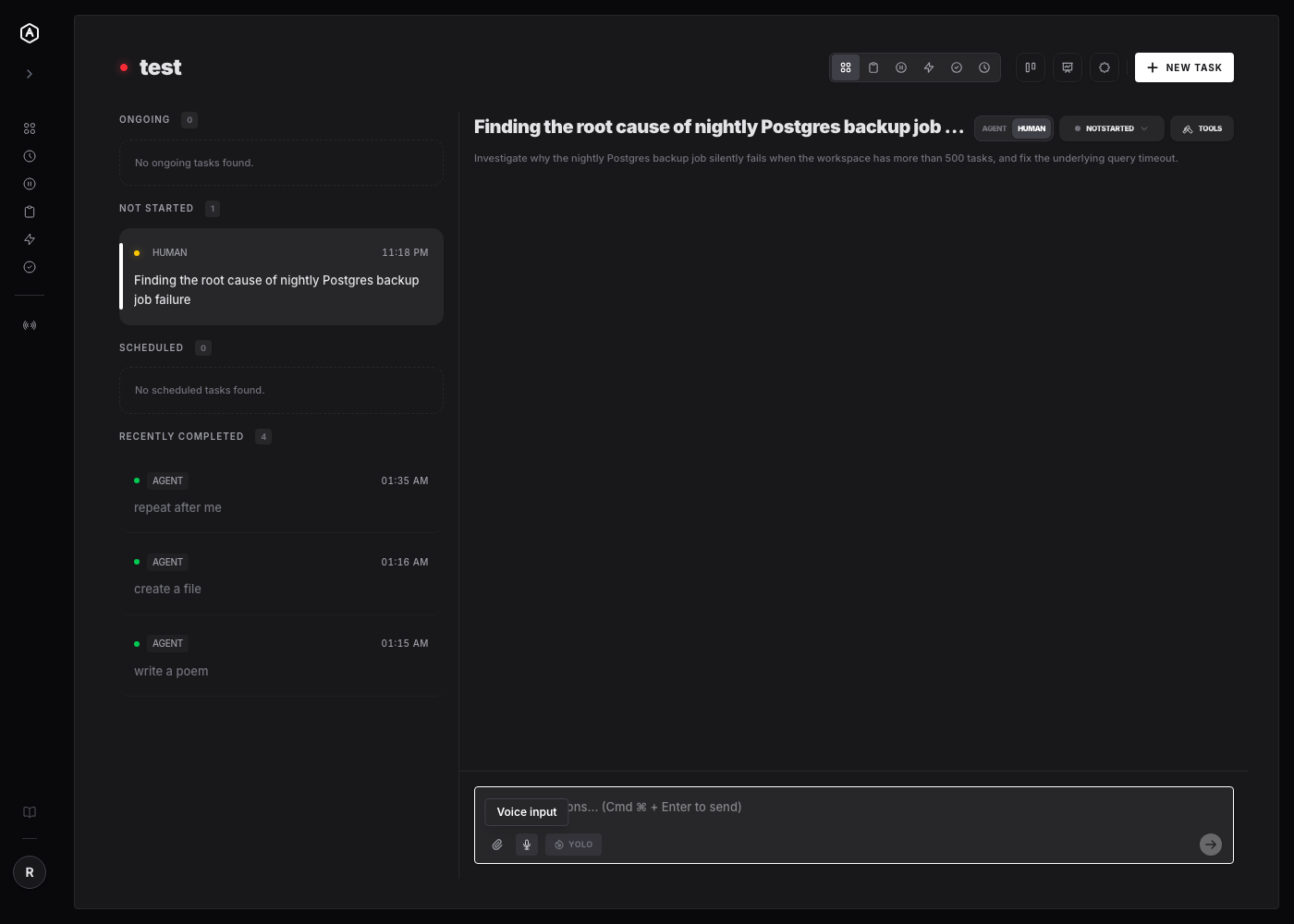
AgentRQ's task composer and reply box now have a microphone button. Click it, talk, click it again, and your words are transcribed straight into the text field — using a speech recognition model that runs entirely in your browser on a computer, and your phone's own dictation on a phone.
Update, 30 September 2026: phones and tablets no longer run Whisper. Crash reports showed the model was too heavy for them, so on an iPhone, iPad or Android device the mic now uses the phone's built-in speech recognition, the same engine as the keyboard's dictation key. Computers still run Whisper locally, exactly as described below. The sections on phones have been rewritten to match.
Whisper, Running Client-Side
The transcription is powered by OpenAI's Whisper model, loaded through @huggingface/transformers and run inside a dedicated Web Worker. On a computer that model is onnx-community/whisper-base, the multilingual base size, which a laptop or desktop can run comfortably.
Under the hood, the worker tries WebGPU first for faster inference, and falls back to WASM automatically if it isn't available — with quantization tuned for each path (fp32/q4 on WebGPU, q8 on WASM).
From Microphone to Model
On a computer, recording uses the browser's native MediaRecorder, capturing audio as webm/opus. Whisper expects 16kHz mono audio, so before transcription the recorded clip is decoded and resampled using an OfflineAudioContext — done once, entirely in-browser, with no server round-trip.
While the model is loading or actively transcribing, the mic button reflects that state directly: a pulsing dot while recording, a spinner while transcribing. Once the text comes back, it's appended into whatever field you were writing in, with a smart space inserted only if the existing text doesn't already end in one.
Language Handling
Whisper's base model is multilingual, and AgentRQ resolves which language to transcribe in with a clear priority order:
- A per-workspace language preference you've explicitly saved (stored in
localStorage). - Your browser's own language setting (
navigator.language), if Whisper supports it. - English, as the fallback.
On a Phone: The Phone's Own Dictation
We first shipped a smaller Whisper model to phones, but even the smaller one was too much. Downloading and running it in a mobile browser tab crashed phones often enough to show up in crash reports. So a phone no longer runs Whisper at all.
On an iPhone, iPad or Android device, the mic button now uses the phone's built-in speech recognition, the engine behind the dictation key on its keyboard. That swap brings three things with it:
- No model download. There is nothing to fetch or cache, so the first dictation starts as fast as the tenth.
- Words appear as you speak. The text fills in live at your cursor instead of arriving in one block after you stop.
- Every language your phone dictates in. The same workspace language setting applies, and your phone's region is kept, so German set in the workspace on an Austrian phone dictates as de-AT. The old English-only limit on mobile, and the toast that warned about it, are gone.
On Android each tap captures one phrase and stops when you pause; tap again to keep going. On an iPhone or iPad it keeps listening until you tap the mic again.
If your phone has dictation turned off, AgentRQ tells you once where to switch it on and hides the mic button. It never falls back to running Whisper on the phone.
Where Your Voice Goes
On a computer, just like local AI title generation, the entire pipeline — recording, resampling, and transcription — runs inside your browser tab. No audio clip and no transcribed text is ever sent to a server to make this feature work. If you're describing a production incident, a customer's account details, or anything else you wouldn't want passing through a third-party API, that matters.
On a phone, your voice is handled by the phone's own speech service, the same one its keyboard uses. Depending on the phone and its settings, Apple or Google may process that audio on their servers, as they do for any dictation you do on the device. AgentRQ itself still never receives the audio, only the text that lands in the field. If you need dictation that stays entirely on the device, use AgentRQ on a computer.
On a computer, the worker itself is also kept alive across views rather than torn down when you navigate away, so the model doesn't need to reload every time you want to dictate another task.
It's a small piece of the composer, but it removes a specific kind of friction: the gap between having a clear thought and having the patience to type it all out.
---
AgentRQ is currently in public beta. Join our GitHub community to help shape the future of human-agent collaboration.