One Workspace, One Job: Why I Isolate My AI Agents
I am a founder, which means I am also the marketing team, the support desk, the release manager and, on most days, the only developer. For a while I ran all of that through one agent in one workspace. It had every repository, every note I had ever written, and a mission description that tried to cover the whole company.
It was never bad. It was just never great at anything. It wrote landing page copy in the tone of a commit message. It suggested a database migration in the middle of a blog post. It remembered things from the wrong half of the business at the worst moment.
So I split it up. Today I run a handful of workspaces, and each one does exactly one thing: one for the static site and its SEO content, one for the core app, one for outreach, and so on. Each has its own mission, its own memory, its own skills and its own task history. They do not know about each other, and that is the point.
This post is why I work this way, where it goes wrong, and where I think reasonable people should disagree with me.
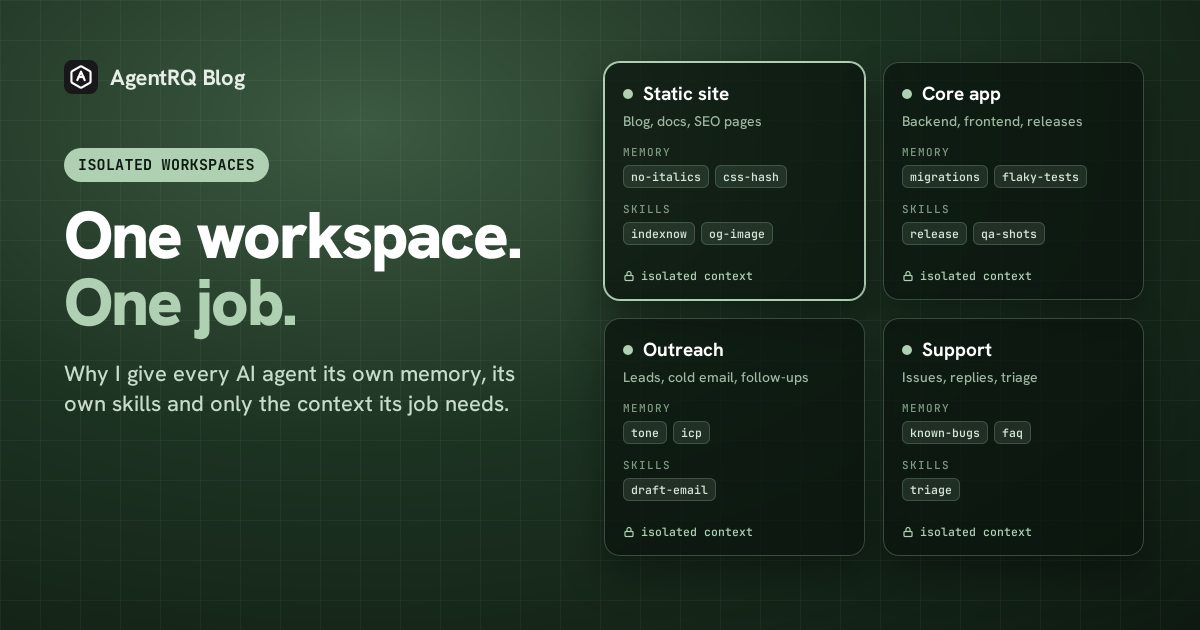
What I Mean by an Isolated Workspace
In AgentRQ, a workspace is the unit an agent connects to. It holds a mission description the agent reads when it starts a task, a task board, a workspace memory the agent reads and writes with loadMemory and saveMemory, and a set of skills it can search and load.
An isolated, single-purpose workspace is just a discipline on top of that: one workspace, one job, one definition of done. Not "engineering". Something closer to "the marketing site and its content pages". Narrow enough that you could describe success in one sentence, and the agent could too.
Reason One: Memory That Stays True
The thing I underestimated most was memory.
An agent that learns things is only useful if what it learned is still correct the next time it is read. In a shared, do-everything workspace, memory rots in a specific way: a lesson that is true for one project gets applied to another where it is false. "Always run the migration before deploying" is gospel in the app repo and nonsense in the static site. "Never use italics, the converter prints literal asterisks" is vital for the blog and irrelevant everywhere else. Put both in one pile and the agent has to guess which rules apply, every single time. Sometimes it guesses wrong, confidently.
In a single-purpose workspace, every note is about the same thing. The workspace that builds this site has a memory index of around forty entries, and every one of them is about this site: the Markdown converter has no italics and no blockquotes, headings render as plain text, the CSS file gets a new hash on every build and that churn is expected, slugs should be long and descriptive because I rejected a short one once. None of those facts would survive contact with another project. Here, all of them are simply true.
That changes how I treat memory. I do not curate it defensively, wondering whether a note will leak into the wrong context. The agent writes down what would have saved it a detour, and the next agent in that workspace reads it and skips the detour. The learning compounds instead of colliding.
It also makes memory readable to me. When I open the memories of one workspace, I am reading the operating manual for one job. I can tell in a minute whether something is wrong. A mixed memory would be a junk drawer, and nobody audits a junk drawer.
Reason Two: Start With Only What the Job Needs
Every task an agent starts pays for its starting context. The mission description, the memory index, the skill descriptions, the instructions: all of it goes into the window before the agent has done anything, and in a stateless loop it is re-read on every turn after that.
A do-everything workspace carries a do-everything starting context. The mission has to explain five businesses. The memory index lists notes for all of them. The skill list offers a release playbook to an agent writing a tweet. The agent reads all of it, on every task, and most of it is noise for the task in front of it.
A single-purpose workspace starts smaller because there is less to say. The mission is a paragraph. The memory index is only what matters here. The skills on offer are the ones this job uses. I have not benchmarked the exact saving, and it depends entirely on how big your notes get and how long your tasks run, so I will not put a number on it. But the shape is simple arithmetic: whatever you load at the start, you pay for on every turn, so loading only what the job needs is the cheapest optimisation there is.
The token bill is actually the smaller half. The bigger half is attention. An agent whose window is full of relevant context makes better decisions than one that has to ignore half of what it was given. I pair this with Clear Context, which starts every task on a clean context, for the same reason: the less stale and unrelated material in the window, the less the agent can be misled by it.
Isolated Does Not Mean Alone: How the Workspaces Talk
The first question people ask when I describe this setup is a fair one: if every workspace only knows its own job, how does anything that spans two jobs get done? A feature has to be built, tested, released, written about and announced, and no single workspace of mine owns all of that.
The answer is that the workspaces are isolated from each other's context, not from each other's work. They coordinate in two ways, and neither of them involves one agent reading another agent's memory.
One: a supervisor agent that sees all
Above the workspaces sits one supervisor agent. It connects to the account-wide Supervisor MCP instead of a single workspace, so it can see every workspace, every task, every status and every piece of history. It can create a task in any workspace, check on progress across all of them, move a task that landed in the wrong place, and read the memory of each one when it needs to.
That is where the cross-domain view lives. The workers stay narrow on purpose; the supervisor is the one place that is allowed to be broad. When I want a feature shipped end to end, I brief the supervisor once, and it hands the core app its half, the static site its half, and outreach its half, each as a task written for that workspace. Every worker still starts with only its own mission and memory. The supervisor carries the big picture so the workers do not have to.
Crucially, the supervisor is one agent with a clear job too: coordinating. It is not a generalist doing the work. It is a dispatcher that knows who does what.
Two: events, not direct messages
The supervisor is great when I am directing the work. Most of the time I am not, and I do not want a supervisor sitting in the middle of every hand-off either. For the routine chain reactions, the workspaces talk through events.
An event is a named signal. When a workspace finishes something the rest of the system might care about, it publishes an event with a short payload describing what happened, and optionally a few answers to the questions the next agent will probably ask. AgentRQ looks up every trigger subscribed to that event name and creates a task in each subscribed workspace, with the payload written into the task body. The publisher does not know who is listening. The listeners do not know who published. The event name is the only contract between them.
These are the events my workspaces run on:
| Event | Published when | Who picks it up |
|---|---|---|
code_changed |
The core app merges a change | QA runs its checks against it |
qa_failed |
QA finds a regression | The core app gets a fix task with the failure attached |
bug_fixed |
The core app lands the fix | QA re-runs the failed check, support tells whoever reported it |
feature_released |
A release goes out | The static site drafts a post and updates the feature pages |
blog_published |
A post goes live | Social turns it into an X thread |
x_thread_created |
The thread is posted | Outreach adds the post and the thread to follow-ups |
Every name is in the past tense, on purpose. An event reports something that already happened, not an order for someone else to carry out. qa_failed is a fact any workspace can react to in its own way; fix_the_bug would be a command aimed at one agent, which is a direct message wearing an event's name.
Read top to bottom, that is a whole release cycle, from merged code to a post in someone's inbox, and no agent in it ever messaged another one directly. A trigger can also name an event to fire when its task completes, so a chain like feature_released into a blog task into blog_published wires itself: the blog agent is told to publish the next event when it finishes, and the social workspace wakes up. The events how-to walks through the setup, and workflows lay the same chain out as a visual graph.
Here is the release part of that chain as an AgentRQ workflow, release_cycle, wired across five workspaces, from code_changed to x_thread_created. Each agent box is a workspace subscribed to the event on its left, and the event it emits when its task is done is written underneath. bug_fixed fans out to two workspaces at once: Support tells the people who reported the bug, while Core App cuts the release.
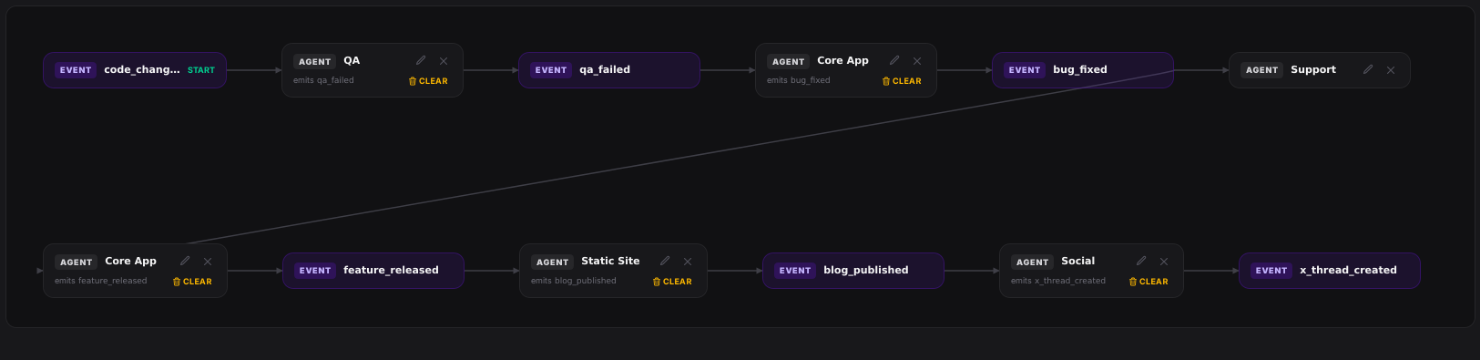
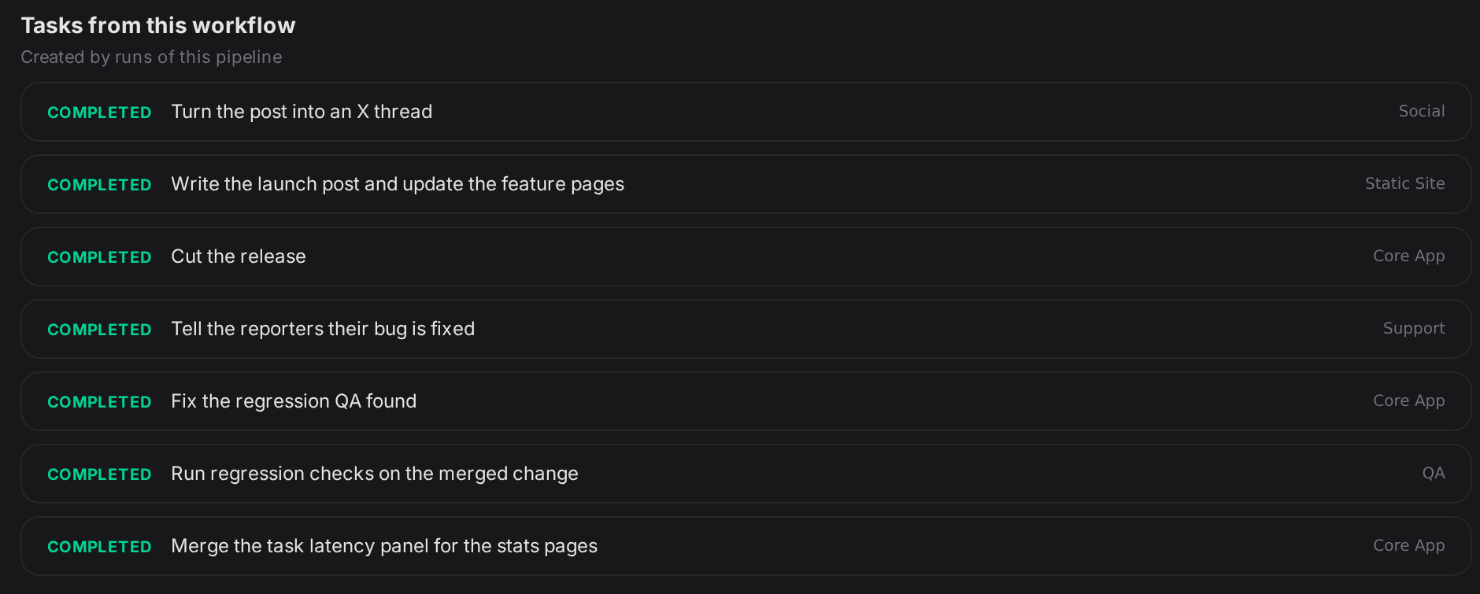
To check that it behaves the way the table says, I ran it once on a local dev build of AgentRQ. One task in Core App merged a change and published code_changed. Every task after that was created by an event, not by me: QA ran its checks and published qa_failed, Core App fixed the regression and published bug_fixed, Support and the release ran side by side, and the release's feature_released put a launch post in front of Static Site, whose blog_published had Social write the X thread. Each workspace did its part over its own connection, knowing only its own mission. The whole run is one list on the workflow page. Outreach is not part of this workflow at all. It listens for x_thread_created on its own, and that is the point: the chain can grow at the edges without anyone rewiring the middle.
Why events rather than letting agents DM each other? Because direct messages rebuild exactly the mess I split the workspaces to escape. An agent that can message any other agent has to know who they all are, what each one does and when to interrupt them, which is the cross-domain context I deliberately kept out of its window. Point-to-point messages also multiply: five workspaces talking directly already have ten pairs of conversations to keep straight, and each one is a place for a request to get lost or answered twice. Events keep every workspace blind to the others while still letting them react to each other. Adding a sixth workspace to the chain is a new trigger, not a new relationship every other agent has to learn.
It also keeps the record clean. Every hand-off is a task, with a title, a body that says what happened upstream, and a status I can see on the task board. When something goes wrong in the chain, I am reading tasks, not reconstructing a group chat between agents.
What This Unlocks
Each agent gets good at one thing, and stays good. Because memory and skills accumulate per job, a workspace gets better with every task it completes. The workspace that runs this site has closed more than ninety tasks, and the lessons from the first ones are still sitting in its memory, still true, still read before every new one. A generalist workspace would have buried them under everything else.
I can delegate without re-explaining. I send a one-paragraph brief from my phone, and the workspace already knows the tone, the build steps, the formatting quirks and what I rejected last time. That is the difference between delegating a task and supervising one, and it is what lets several of these run while I am doing something else entirely, as I wrote about in how I scale my startup while sleeping.
Mistakes stay small. A bad note, a wrong skill or a confused agent can only damage one job. When the outreach workspace learns something wrong, the release process is untouched. Isolation is a blast radius, not just a filing system.
Swapping agents gets cheap. The knowledge lives in the workspace, not in one vendor's config file. If a different agent is better at a particular job, I can point it at that workspace and it inherits the same mission, memory and skills on day one.
The Pitfalls I Actually Hit
This is not free, and I have made most of the mistakes.
Going too narrow. My first instinct after splitting was to split everything. A workspace for blog posts, another for glossary terms, another for feature pages. They shared the same repository, the same build, the same quirks, and I ended up teaching three workspaces the same lessons. The rule I use now: split where the knowledge diverges, not where the task names do. If two jobs would write the same notes, they belong in the same workspace.
Knowledge that genuinely is shared. Some things are true everywhere: how I like pull requests described, which branch to never push to, how to reach me. Duplicating those into every workspace is exactly the rot I was trying to escape, just spread thinner. The answer is to keep workspace memory for what is local, and put what is universal somewhere shared. In AgentRQ, skills can be shared into several workspaces from one source, so a playbook I fix once is fixed everywhere it is used.
Tasks that cross the line. Some work touches two jobs at once: a feature launch needs code in the app and a post on the site. I do not create a third workspace for it. I split it into two tasks, one per workspace, and let each do its half with its own context, either by briefing the supervisor or by letting a feature_released event start the second half. When a task lands in the wrong place, I move it to the right workspace with its history intact rather than starting over.
Memory still goes stale. Isolation keeps memory relevant, it does not keep it current. Tools get upgraded, a limitation gets fixed, and the note that warned about it becomes a lie. I have had notes in this very workspace that were wrong and needed correcting. Single-purpose memory is easier to audit, but someone still has to audit it, and it helps to tell the agent to correct or delete a note when it finds one that no longer holds.
Setup cost. A new workspace needs a mission, a connected agent and a few tasks before its memory is worth anything. For a job you do once, that is overhead with no payoff. Isolation pays back on work that repeats.
Where Reasonable People Disagree
I want to be fair here, because there are good arguments against doing it my way.
"Context windows are huge now, just give the agent everything." Windows really have grown, and a strong model can ignore a lot of irrelevant text. But every token in the window is still paid for on every turn, and ignoring noise is a skill models have, not one they are perfect at. I would rather not make the agent exercise it on every task. That said, if your contexts are small and your budget is not a concern, this argument carries real weight.
"A generalist sees connections a specialist misses." This is the strongest objection, and it is true. The agent that knows both the app and the marketing site might notice that a new feature deserves a post. My single-purpose workspaces will never notice that on their own. I cover it with the supervisor, which is the one agent allowed to see across workspaces, and with events for the connections I already know about. Even so, a supervisor coordinating narrow workers is not the same as one mind holding everything at once, and it will miss some of the leaps a generalist would make. If cross-domain insight is your main value, a generalist workspace may serve you better than mine.
"Retrieval solves this." A good retrieval layer over one big memory could, in principle, pull only the notes that matter for each task. I think that works well when retrieval is good, and fails quietly when it is not: the wrong note ranks high, and the agent acts on it. Isolation is a blunter tool, but it fails loudly. You can see which workspace you are in.
"This is overkill for small projects." Often, yes. If you have one repository and one kind of work, one workspace is the single-purpose workspace. Everything in this post starts to matter when you have several jobs with different rules, which is exactly where a solo founder ends up.
"Teams need shared context, not silos." For a team, isolation by job still works, but the boundaries are different: they should follow ownership and on-call lines, not one person's mental model. What I describe is shaped for one person running many jobs.
Everyone Has Their Own Flavor
None of this is a law. It is the setup that works for how my brain and my company are shaped right now: one person, many unrelated jobs, a strong preference for delegating and walking away.
I know people who run one giant workspace and are very productive with it, because their work is one continuous thing and every piece of context really is relevant. I know people who spin up a fresh workspace per feature and throw it away when it ships. I know teams who isolate by customer, not by function. Each of them has looked at the same trade-offs, token cost versus convenience, focus versus breadth, and landed somewhere different for good reasons.
If you take one idea from this, make it the question rather than my answer: when your agent's memory grows, is every note in it true for every task it will run? If yes, keep it together. If you find yourself writing "except in the other project" into your notes, that is usually the sign that one workspace wants to become two.
Try splitting one job out, give it a week of tasks, and read its memory at the end. You will know quickly whether this flavor is yours.