Agent Platform with Scheduled Cron Agents
Some agent work should happen on a clock, not when someone remembers to ask. Triage new issues every hour. Audit dependencies every morning. Write the release notes every Monday. Check the error budget twice a day.
The usual way to do that is a crontab line that runs an agent CLI with a prompt, or a scheduled CI job. Both start the agent, and that is all they do. Nobody sees the run until it fails. Runs pile up when one is slow. The output lands in a log file, and when the agent has a question there is nobody to ask.
The short answer: use an agent platform where a schedule creates real tasks. In AgentRQ, a repeated task is a template that spawns a fresh task on its schedule, in the right workspace, for whichever agent works there: Claude Code, Codex, Gemini CLI or any ACP agent. Each run is a normal task on the board, with its own thread, its own trajectory and a human one click away.
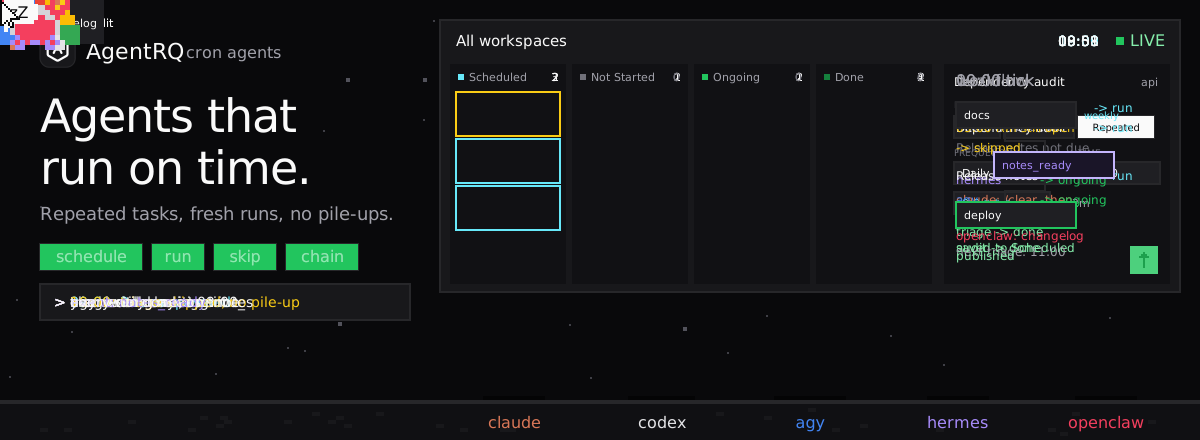
The animation below shows a day of scheduled agents in 24 seconds. The rest of this post explains how it works and what it unlocks.
How a Scheduled Agent Works
1. You write the task once. Open any workspace and write the task as usual: a title, the instructions, an assignee. Then click the calendar button in the composer. The Execution Strategy popover has three choices: None, One-time and Repeated. Pick Repeated.
2. You pick a frequency. The choices are Every 15 mins, Every 30 mins, Hourly, Bi-hourly, Twice a day, Daily, Weekly, Monthly and Custom, where you tick the days of the week. For daily and slower schedules you also pick a time. The popover shows the cron expression it built, such as 0 9 * * *, and when the next run will start, in your own time zone.
3. The task waits in Scheduled. It does not go to the agent. It sits in the workspace's Scheduled view as a template, grouped by frequency and sorted by which runs next, with a label such as "in 2h". You can open it to change the instructions, the assignee or the schedule at any time, or delete it to stop it.
4. On the minute, a fresh run starts. AgentRQ checks schedules every minute. When one is due, it creates a new task from the template in Not Started on the task board, and the workspace's agent is notified the same way it would be for a task you just wrote. The template stays in Scheduled for the next run.
5. The run is a normal task. The agent works it, replies in the thread, asks you questions if it needs to, and completes it. Everything it did is in the task's Tool Call History. The next run gets a new task with a clean thread, so one day's audit never gets mixed up with the next day's.
Repeated schedules sit next to the one-time schedule, which starts a task once at an exact minute. Both live under Task Scheduling.
No Pile-Ups When a Run Is Slow
The classic cron problem is overlap. A job that runs every hour takes 90 minutes one day, the next one starts on top of it, and now two agents are triaging the same issues.
AgentRQ does not start a run while the previous one is still open. When a schedule is due, it first checks for a run of the same template that is still Not Started or Ongoing. If there is one, that tick is skipped, and the schedule tries again at the next one.
That one rule handles three cases:
A slow run. The 09:00 triage is still going at 10:00, so there is no 10:00 triage. The 11:00 one starts on time if the agent has finished.
An offline agent. If the agent is not connected over the weekend, Saturday's run waits in Not Started, and Sunday's is skipped. On Monday the agent finds one task to do, not three days of copies.
A stuck run. If a run is blocked on a question for you, no new runs stack up behind it. Answer the question, and the schedule carries on.
It also never fires twice for the same minute, even when AgentRQ runs on several servers.
Every Run Starts Clean
A scheduled agent that has been running for weeks should not carry weeks of context into today's run.
Each run is a new task, so the agent reads only that task's instructions. For Claude Code there is one more step: with Clear context before each task on, AgentRQ sends /clear to the agent's terminal before it hands the run over, so the session starts without the previous task in its context. You can set it per workspace or per task.
What the agent should remember between runs goes in Workspace Memory instead: "the flaky test in billing is known, skip it", "we pin React to 18 until the upgrade". Every run loads the same notes, and a lesson learned on Tuesday is used on Wednesday.
Schedules That Start Whole Workflows
A schedule can start more than one agent's work. Give a repeated task a completion trigger, an event such as notes_ready or a whole workflow, and every run fires it when it completes.
So a weekly Release notes run in the docs workspace finishes, fires notes_ready, and the deploy workspace gets Ship changelog for its agent. A nightly Dependency audit can hand its findings to an Open upgrade PRs task in the api workspace, which hands off to qa. Each scheduled run starts a fresh run of the workflow, so this week's chain never picks up last week's state.
Agents Can Schedule Work Too
People are not the only ones who know something should happen regularly. An agent connected over MCP can create a repeated task with a cron schedule in the same call it uses to create any task. An agent that has just set up a new service can schedule "check its error rate every hour" for itself, or the Supervisor can put a recurring task into another workspace.
Schedules an agent creates are hourly at most. Every 15 and 30 minutes are for schedules you set yourself, so an agent cannot fill your board with tasks by accident.
Cron, CI or an Agent Platform
| Crontab + agent CLI | Scheduled CI job | /loop in a session | AgentRQ repeated task | |
|---|---|---|---|---|
| Where the schedule lives | One machine | The CI config | One open session | The workspace, visible to the team |
| Each run is | A process and a log | A job and a log | Another turn in a long session | A task with its own thread |
| Slow run overlaps the next | Yes, unless you add locking | Depends on config | No, but one session blocks | No, the tick is skipped |
| Agent can ask you a question | No | No | Only at that terminal | Yes, in the task thread |
| Context between runs | Whatever you pass in | Whatever you pass in | Grows with every turn | Clean task, plus shared memory |
| Change the schedule | Edit the crontab | Edit and push config | Restart the loop | Open it in Scheduled |
| Start the next step | Write a script | Write another job | Ask the agent | An event or workflow |
Cron and CI are still the right tools for builds and scripts that never need judgment. A loop is still the right tool for watching something that changes, like a deploy in progress. When the scheduled job is an agent doing real work, it needs what every other agent task needs: an owner, a thread, a place to ask, and a record of what it did.
What This Unlocks
Agents that work while you are not there. A schedule does not depend on your laptop being open or a terminal staying alive. It lives in AgentRQ, and the run goes to whichever agent is connected to the workspace when it starts. Run the agent through the ACP Gateway on one of your Machines and runs are picked up even when nobody has a terminal open.
Routine work that stays visible. Every run is a card on the board and an entry in the Scheduled view. You can see what ran, what is running and what is next, and so can your team. A scheduled agent stops being a crontab line that only one person knows about.
Routine work with a human in reach. When the nightly audit finds something it should not decide alone, it asks in the task thread and waits. You get a real-time notification, answer from your phone, and the run finishes. A script on a cron would have guessed or failed.
No babysitting the scheduler. Overlap, missed weekends and stuck runs are handled by the skip rule, not by locking code you wrote yourself.
Recurring chains, not just recurring jobs. A weekly schedule that fires a workflow turns a whole process, such as notes to changelog to announcement, into something that happens every week on its own.
Top Use Cases
1. Issue and alert triage, hourly. "Read new GitHub issues since the last run, label them, close duplicates and ask me about anything that looks like a security report."
2. Dependency audit, daily. "Check for new vulnerabilities in our dependencies and open upgrade PRs for patch releases."
3. Flaky test hunt, nightly. "Rerun the failing tests from today's CI runs, find the flaky ones and open a task for each with what you found."
4. Release notes, weekly. "Collect this week's merged pull requests and draft the release notes," with notes_ready starting the changelog workflow.
5. Docs drift check, weekly. "Compare the API reference with the code on main and fix anything that no longer matches."
6. Error budget check, twice a day. "Read the error dashboard and tell me if any endpoint is above its budget."
7. Monthly cleanup. "Delete merged branches older than 30 days and list stale feature flags."
Try It
Open a workspace, write a task, click the calendar button and choose Repeated with Every 15 mins. Watch it wait in Scheduled, then appear on the board as a fresh run. Get started with AgentRQ and connect your first agent in a few minutes.
FAQ
What schedules can I set?
Every 15 or 30 minutes, hourly, every two hours, twice a day, daily, weekly, monthly, or custom days of the week, each with a time for daily and slower schedules. Behind each one is a standard 5-field cron expression, shown in the popover.
What time zone does a schedule use?
Yours. You pick the time in your browser's time zone, and the Scheduled view shows the next run back in your time zone.
What happens if the previous run has not finished?
That run is skipped. A new run starts only when no earlier run of the same schedule is still Not Started or Ongoing.
What if my agent is offline when a run is due?
The run waits in Not Started, and the agent picks it up when it connects. Later ticks are skipped until it does, so runs do not pile up.
Does each run get a fresh context?
Each run is a new task with its own thread. For Claude Code, Clear context before each task also sends /clear before the run starts. Shared lessons go in workspace memory.
Can an agent create a scheduled task?
Yes, through the same MCP tool it uses to create any task. Schedules created by agents are hourly at most.
Can a scheduled run start other agents?
Yes. Give the repeated task an event or a workflow as its completion trigger, and each run starts it when it completes.
How do I stop or change a schedule?
Open it from the workspace's Scheduled view to edit it, or delete it to stop future runs. Runs that already started are not affected.