
Enable Claude Channels for Team and Enterprise
AgentRQ sends tasks to Claude Code through a channel. On a Claude Team or Claude Enterprise plan, an organization admin has to allow channels first, because the setting is off by default. Until they do, Claude Code starts and connects, but it never receives a task. The fix takes a minute: an admin opens Admin settings, picks Claude Code, and turns on Channels.
This page is one of our connect agents guidelines. It follows on from Connect Claude Code with Machines, and the screenshots come from a real Claude Team organization on Claude Code 2.1.328, taken on November 18, 2026. You only need this on Team and Enterprise plans. On a personal plan Claude Code has no such organization setting.
How You Know Channels Are Blocked
Start Claude Code from AgentRQ and open its terminal. When your organization has not allowed channels, Claude Code prints this under its banner:
1. Read the warning. It names the flag AgentRQ uses to load its channel, and it says Inbound messages will be silently dropped. Nothing breaks visibly: the session runs, but a task you create in the workspace never reaches it.
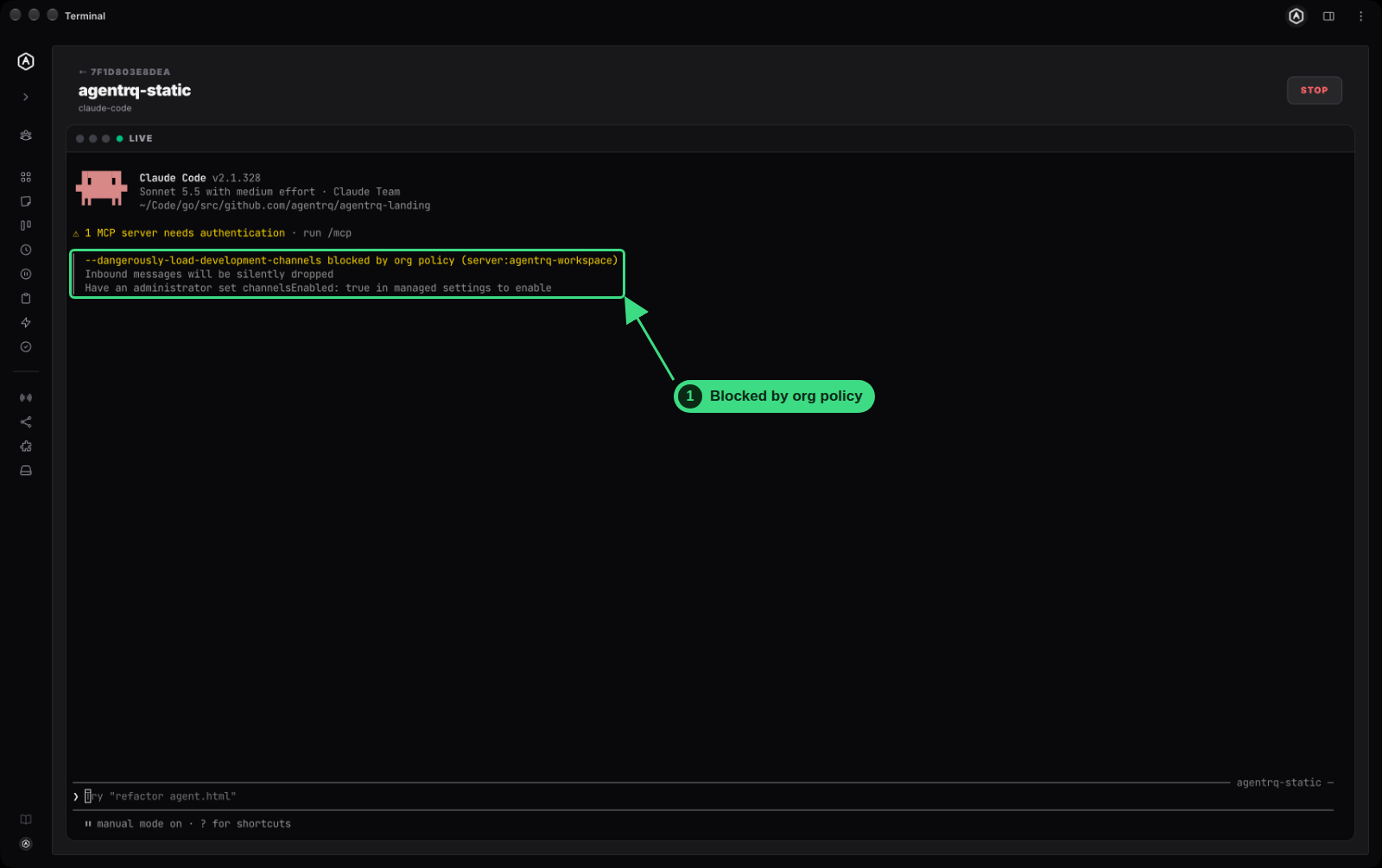
The message says to set channelsEnabled: true in managed settings. Team and Enterprise admins do not have to edit a file for that: the Channels switch in Claude's admin settings does the same thing for the whole organization.
Step by Step: Turn On Channels as an Admin
You need to be an admin or owner of the Claude organization. If you are not, send an admin this page.
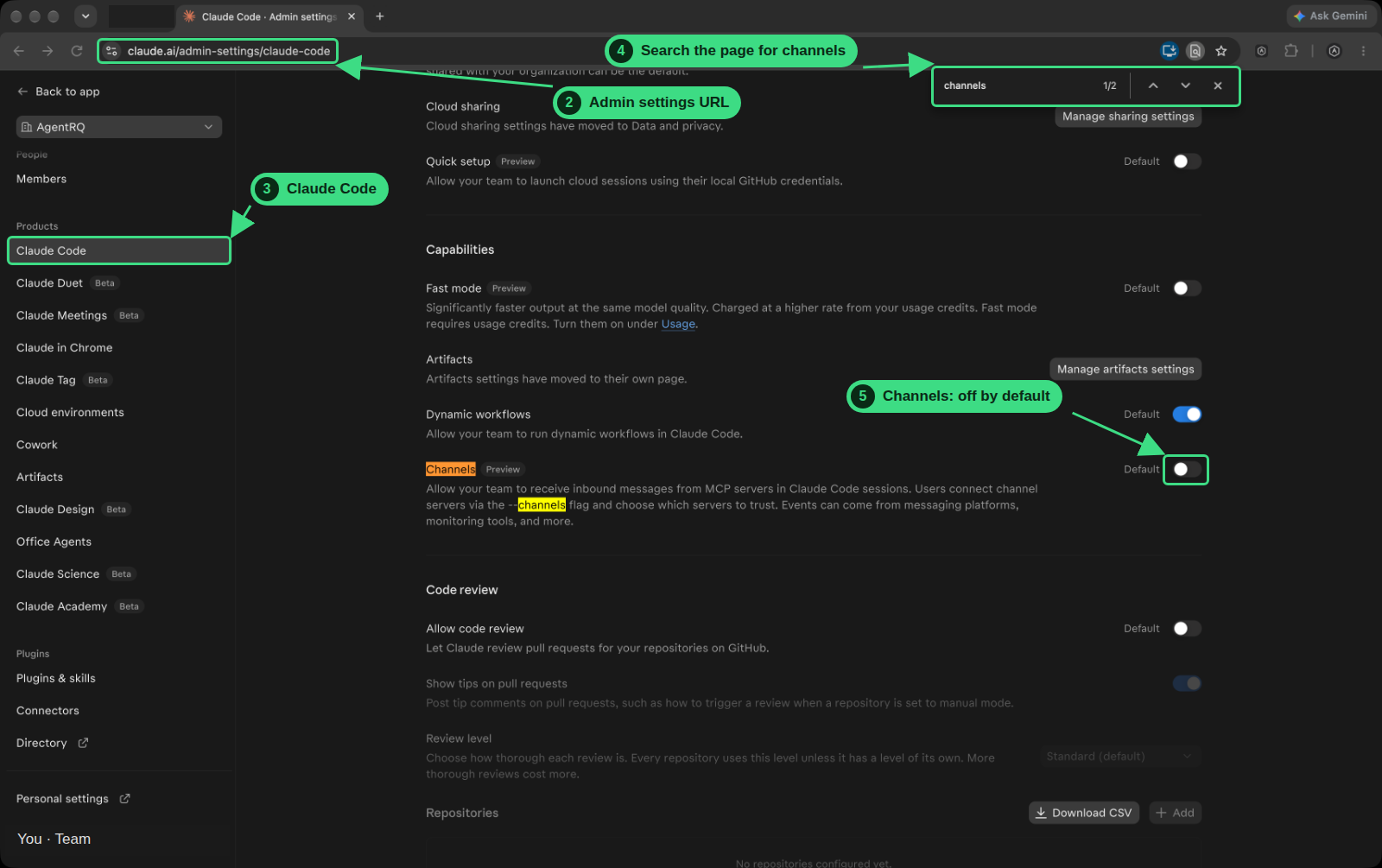
2. Open the admin settings. Go to claude.ai/admin-settings/claude-code. The address is claude.ai/admin-settings/claude-code.
3. Pick Claude Code. If you opened Admin settings another way, choose Claude Code under Products in the left menu.
4. Search the page for channels. Press Ctrl+F (Cmd+F on a Mac) and type channels. The browser jumps to the setting and highlights it.
5. Find the Channels toggle. Under Capabilities, Channels is marked Preview, and it reads: "Allow your team to receive inbound messages from MCP servers in Claude Code sessions." The toggle is off, and its label says Default.
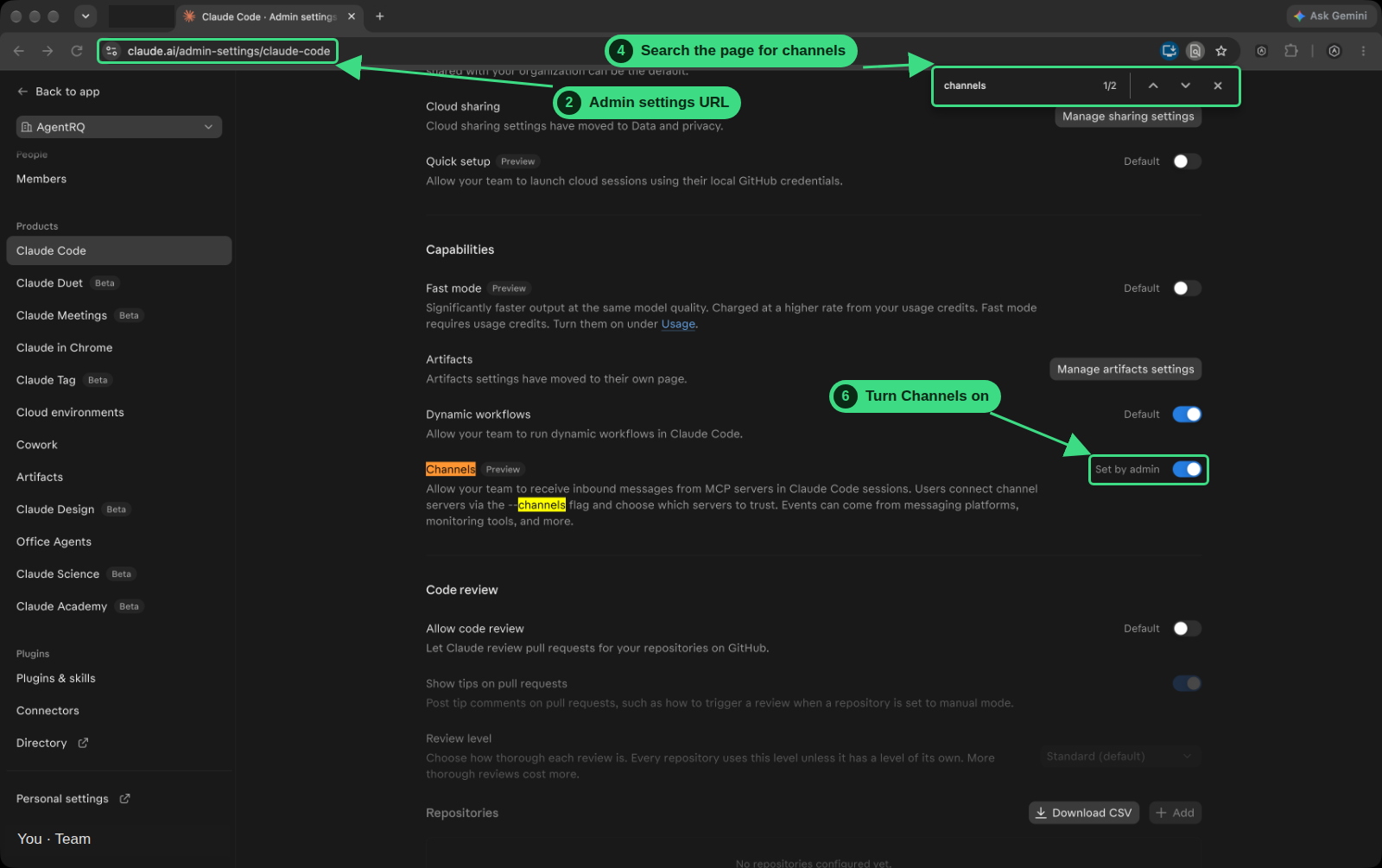
6. Turn Channels on. Click the toggle. Its label changes from Default to Set by admin, and the toggle turns blue.
7. Wait 5 to 10 minutes. The change does not reach Claude Code at once: it lags, and users have to wait 5 to 10 minutes before it is reflected. Starting Claude Code sooner still shows the blocked warning.
8. Start Claude Code again. The setting is read when Claude Code starts, so a session that is already running keeps the old policy. Stop the agent in AgentRQ, start it again from the workspace, and the blocked warning is gone. Claude Code now asks you to confirm the development channel, as in step 12 of the machines guide.
9. Send a task. Create a task in the workspace. It now reaches Claude Code and moves to Ongoing.
What Turning Channels On Allows
Channels let MCP servers push messages into a Claude Code session. For your organization that is every channel, not only AgentRQ's: users still choose which servers to trust with the --channels flag, and events can come from messaging platforms, monitoring tools and more. Turn it on if you want your team's agents to take tasks from AgentRQ. You can turn it off again from the same toggle.
FAQ
Do I need this on a personal Claude plan?
No. The organization setting exists on Claude Team and Claude Enterprise. On a personal plan, start Claude Code with the flag from the machines guide and answer the confirmation prompt.
I am not an admin. What can I do?
Ask a Claude organization admin or owner to turn on Channels under Admin settings → Claude Code, and share the warning from your terminal so they can see what it blocks. Until then Claude Code cannot receive AgentRQ tasks.
I turned it on and the warning is still there.
Wait 5 to 10 minutes, because the setting takes that long to reach users. Then stop the agent from AgentRQ and start it again. The policy is read at startup. If the warning stays, reload the admin page and check that the toggle says Set by admin.
Can I set it in a file instead?
Yes. The warning names the key: channelsEnabled: true in Claude Code's managed settings. Team and Enterprise admins usually use the toggle, which is the same setting for everyone in the organization.