
Hook Deliveries: Replay, Rotate and Reach Your Server
Every request a registration receives is listed under its Deliveries, with a status that says what the hook made of it: published means a task is on its way, ignored means nothing was routed for it, and rejected names the reason, usually a wrong secret. Open the registration in Events → Hooks to see them. This guide explains every status, how to replay a failed request and rotate a leaked URL, and, for self-hosted servers, how to make the payload URL reachable and install the built-in hooks.
This page is one of our Hooks guidelines. It follows the Hooks docs and the production setup, and was checked against AgentRQ v0.19.6 on November 26, 2026.
Why the Sender's Logs Don't Help
The server answers 202 Accepted as soon as a request with a valid URL arrives, before the hook has looked at it. So a wrong secret or signature does not show up in GitHub's, Jira's or your script's logs: they all see a success. The registration's Deliveries is where the answer is.
A URL with no token, a wrong token, or a deleted or disabled registration answers 404, and the request is not saved. That is the one failure the sender does see.
Read a Registration's Page
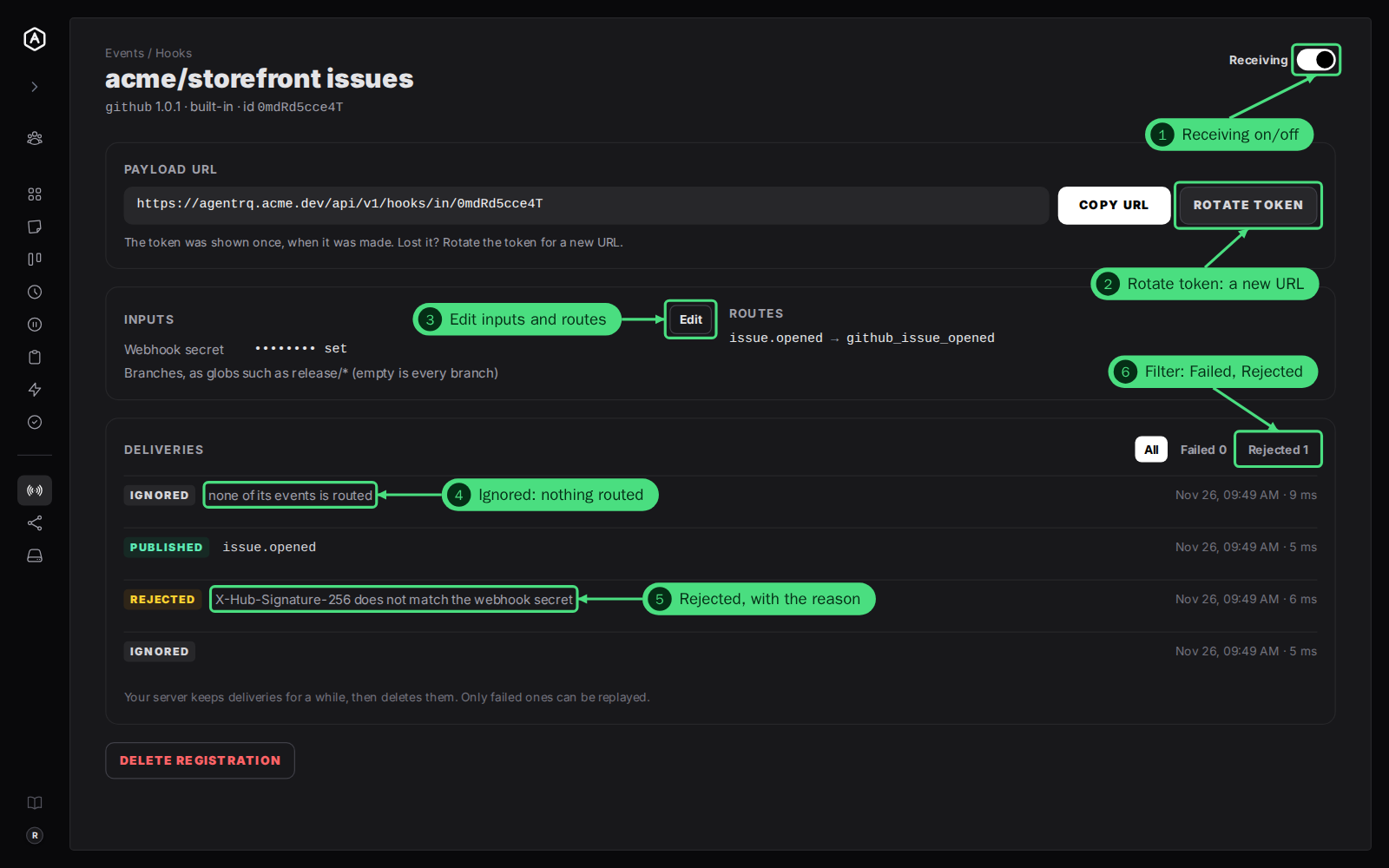
1. Receiving. Turn it off to stop the registration taking requests without deleting it: its URL answers 404 until you turn it back on.
2. Rotate token. Gives the registration a new payload URL. See Rotate a leaked URL.
3. Edit. Change the name, the inputs or the routes. A secret input left empty keeps its value.
4. An ignored delivery. Genuine, but nothing to do: here GitHub's ping when the webhook was added, which fires no routed event.
5. A rejected delivery. The hook refused it, and the reason says why: here a signature that does not match the webhook secret.
6. Filter. Show only one status, such as rejected or failed.
Every Delivery Status
| Status | Meaning | What to do |
|---|---|---|
| queued, processing | Waiting for, or in, the hook. | Wait a few seconds. |
| published | Accepted, and its events fired. | If no task appeared, the event has no trigger, or the trigger's workspace is not the one you are looking at. |
| routed | Accepted, and its events are about to fire. | Wait a moment. |
| ignored | Genuine, but nothing to do: none of its events is routed, or the hook said so, such as a run on a branch outside Branches or a Jira issue assigned to someone else. | Route the event, or widen the filter, if you wanted a task. |
| rejected | The hook refused it, usually a wrong secret or signature. The reason is shown. | Copy the secret into the service again, or Edit and generate a new one. |
| duplicate | The sender delivered the same request again: the same GitHub delivery id, or the same Idempotency-Key. | Nothing: it is working. |
| failed | The hook crashed or ran out of time on six tries, over about two and a half hours. | Click Replay to run it again. |
Requests are kept for 7 days by default, for the log, for replay and to catch a provider's retry.
Replay a Failed Request
A delivery that ends failed has a Replay button. It runs the stored request through the hook again, as if it had just arrived, and fires its events if the hook accepts it this time. Use it after a fix to a hook of your own, or after the server's operator re-enabled or upgraded a built-in one.
Rotate a Leaked URL
The payload URL is shown in full once, when you create the registration. If you lose it, or it leaks, click Rotate token on the registration's page and confirm. The registration gets a new token, the old URL answers 404 at once, and the page shows the new full URL to copy into the service.
Rotating changes only the URL. A webhook secret or generic token is an input: change it with Edit, then update the service.
Make the Payload URL Reachable
On agentrq.com, there is nothing to do. On a self-hosted server, the payload URL is built from AGENTRQ_BASE_URL, so that must be the address the outside service can reach, not localhost. The URL looks like <AGENTRQ_BASE_URL>/api/v1/hooks/in/<id>?agentrq_hook_token=… and takes POST with no sign-in.
- → Behind a reverse proxy, it must pass
POST /api/v1/hooks/in/through. The proxy setup in the production docs does. - → On a laptop or a private network, put a tunnel in front of the server and set
AGENTRQ_BASE_URLto the tunnel's address:
- → A sender inside the same network, such as a CI runner or a cron job, can use the private address, as long as
AGENTRQ_BASE_URLis it.
The page always shows the URL at the current AGENTRQ_BASE_URL. When that address changes, the service still has the old one: change the address in the URL it holds, since the token stays the same, or Rotate and give it the new full URL.
Install a Built-In Hook on a Self-Hosted Server
On agentrq.com, the github, jira and generic hooks are already there. A self-hosted server lists only the hooks its operator has added, and the operator adds each one once for every account.
From the admin page. Download agentrq-hook-<name>_<version>.wasm from the server's release on GitHub, sign in at <AGENTRQ_BASE_URL>/admin/login with the root access token, and upload the file on the Hooks tab.
From a script. Sign in for a token, which lasts 30 minutes, then send the module gzipped, since one built with Go is larger than a request may be. Sign-in is allowed once every 10 minutes per address.
Later changes:
- →
PUT /admin/v1/hooks/<id>upgrades a hook with a new version of it. That is refused when it would break a registration: an event someone routes is gone, an input becomes required, or an input changes type or stops being secret. - →
PATCH /admin/v1/hooks/<id>with{"enabled": false}turns a hook off for every account. Its URLs answer 404 until it is turned back on. - →
DELETE /admin/v1/hooks/<id>removes one that nothing registers.
Server settings for hooks:
| Variable | Default | What it does |
|---|---|---|
| AGENTRQ_HOOKS_STORAGE | local | Where the hooks' WebAssembly modules are kept: local, or s3 under hooks/. Never public. |
| AGENTRQ_HOOKS_ALLOW_USER_HOOKS | false | Let every account upload its own hooks. |
| AGENTRQ_HOOKS_DELIVERY_RETENTION | 7d | How long a request is kept, at least 1d. |
| AGENTRQ_HOOKS_MAX_PAYLOAD_SIZE | 65536 | Most bytes one event payload may hold, from 1024 to 1048576. |
FAQ
GitHub says the delivery succeeded, but no task appeared. Why?
GitHub only saw the 202, which the server sends before the hook checks the request. Open Deliveries: a rejected row names the reason, and an ignored row means the GitHub event was not routed.
A delivery is published but no task appeared. Why?
The event fired, so look at the event: it needs a trigger, and the trigger names the workspace that gets the task. Look in that workspace's Not started column.
Can I replay a rejected request?
No. Replay is for failed requests, where the hook never gave an answer. A rejected request had an answer: send it again from the service after fixing the secret. GitHub has a Redeliver button on each delivery.
Does rotating the token change the webhook secret?
No. The token is in the URL and picks the registration. The secret is an input the hook checks. Rotate changes the first, Edit the second.