
How to Enable YOLO Mode in Codex CLI
To run OpenAI Codex CLI in YOLO mode, start it with codex --yolo. Codex then runs every command without asking and without its sandbox. That second part is what sets Codex apart from most agents, and it is the reason to read the rest of this page before making it your default.
This page is one of our YOLO mode guides, and part of our guide to YOLO mode in every coding agent. Every flag below was checked against the Codex source (openai/codex, commit 4d53e6b) and OpenAI's Codex documentation on October 7, 2026.
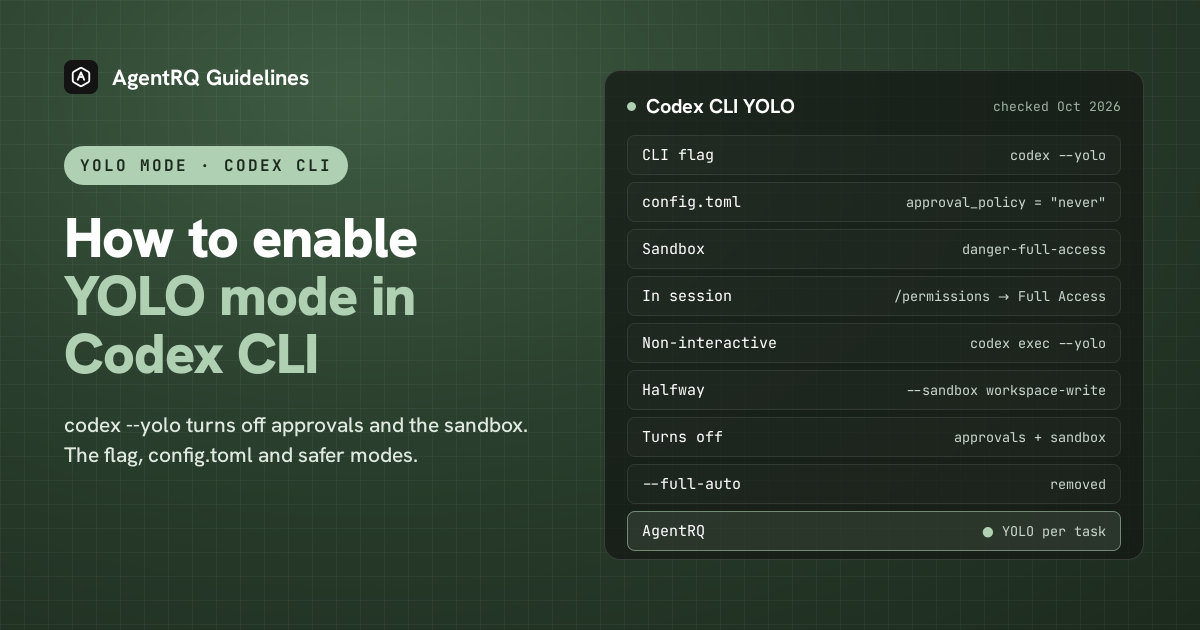
What YOLO Mode Turns Off in Codex
Codex has two separate safety layers, and YOLO mode removes both.
- → Approvals. Codex's approval policy decides when it stops to ask you. The default,
on-request, lets the model ask whenever it wants to do something the sandbox would block. - → The sandbox. Codex runs commands inside an operating-system sandbox: Seatbelt on macOS, bubblewrap and seccomp on Linux, and a native sandbox or WSL2 on Windows. The sandbox decides which files a command can write and whether it can reach the network.
codex --yolo sets the approval policy to never and the sandbox to danger-full-access. Commands run with no approval prompt and no isolation, with the same access you have. Codex's own help text calls the flag "EXTREMELY DANGEROUS" and says it is meant for environments that are already sandboxed from the outside.
How to Enable YOLO Mode in Codex Natively
| Where | Full YOLO | Halfway |
|---|---|---|
| Command line | codex --yolo |
codex --sandbox workspace-write |
| config.toml | approval_policy = "never" and sandbox_mode = "danger-full-access" |
sandbox_mode = "workspace-write" |
| In a session | /permissions, then Full Access |
/permissions, then Default |
| Non-interactive | codex exec --yolo |
codex exec --sandbox workspace-write |
The Codex YOLO Mode Command
--yolo is the short alias of --dangerously-bypass-approvals-and-sandbox, and the two are identical. You can get the same effect with the separate flags:
In the interactive CLI, --yolo cannot be combined with -a/--ask-for-approval, because it already sets the approval policy.
Make YOLO the Default in config.toml
Codex reads ~/.codex/config.toml. These two lines make every session start in YOLO mode:
approval_policy accepts untrusted, on-request (the default), never, or a granular table that turns individual kinds of prompt on and off. on-failure is still accepted, but it is now just another name for on-request. sandbox_mode accepts read-only, workspace-write and danger-full-access.
A gentler option is to keep YOLO out of your default config and put it in a profile. In current builds, codex -p yolo loads a separate file, ~/.codex/yolo.config.toml, so put the two lines there and start YOLO sessions with codex -p yolo only when you mean to. Older versions read [profiles.yolo] tables inside config.toml instead, and those still work.
Switch Codex to YOLO Mode Inside a Session
Type /permissions in a running session. It opens a picker with three presets: Read Only, Default and Full Access. Full Access is the YOLO preset: no approvals and no sandbox. The older /approvals command no longer exists, and /approve only retries a single action that the automatic reviewer turned down. There is no default keyboard shortcut for Full Access.
Codex YOLO in the IDE Extension
The Codex extension for VS Code and other editors reads the same ~/.codex/config.toml, so the config above applies there too. We could not confirm the extension's current mode names on an official page, so check the mode picker in the chat panel rather than relying on names from older screenshots.
YOLO in codex exec
codex exec runs one task without a chat, for scripts and CI. It never asks for approval, because there is nobody to ask, so the sandbox is the only thing that matters. By default it is read-only. codex exec --sandbox workspace-write lets it edit the project, and codex exec --yolo removes the sandbox entirely.
The Halfway Options in Codex
- → workspace-write.
codex --sandbox workspace-writeis what most people actually want. Codex edits files and runs commands inside the project without asking, and only stops when something needs to leave the sandbox, such as writing elsewhere or using the network. - → --approve-for-me. This newer flag keeps the workspace-write sandbox and sends approval requests to an automatic reviewer instead of you. It is in the Codex source but not yet in OpenAI's docs.
- → --full-auto is gone. OpenAI's docs still describe it as deprecated, but it has been removed from the CLI. Use
--sandbox workspace-writeinstead.
How to Enable YOLO Mode in Codex Through AgentRQ
Codex's own YOLO switch covers a whole session. AgentRQ lets you make the decision per task, and answer from somewhere other than the terminal.
Approve From the AgentRQ Task Instead of the Terminal
Connect Codex to an AgentRQ workspace through the ACP Gateway, which runs Codex's ACP adapter for you (Codex setup guide):
Then start it without --yolo. The gateway also moves each new session out of any mode that would approve on its own, such as full access or the automatic reviewer, and into one where Codex asks a person. Each permission request now shows up in the AgentRQ task on the web, on your phone or in Slack, together with the command or edit it is asking about. Answer Allow Once, Always Allow or Deny from wherever you are, and Codex carries on. If nobody answers within 30 minutes, the gateway cancels the turn instead of guessing. Change the limit with --permission-timeout.
Turn On YOLO for One Task
Flip the YOLO toggle on a task, or when you create it, to put just that task in YOLO mode. Every permission request in it is approved automatically and Codex never waits, while every other task in the workspace still asks. Scheduled tasks, event triggers and workflow steps have the same switch, so an unattended job can run in YOLO while your interactive work stays supervised.
A Safe YOLO Setup for Codex
- → Allow the boring tools, not everything. Always Allow adds the tool to the workspace's auto-approved list, so the routine calls stop asking and the risky ones still do. Prune that list in workspace settings now and then.
- → Leave the workspace-wide switch off. Workspace settings also has YOLO Mode (Execute All). Turn YOLO on per task instead, so it never outlives the job you trusted.
- → Keep the Codex sandbox on. Per-task YOLO in AgentRQ removes the questions, not the sandbox. Codex still runs commands inside
workspace-write, so even an approved command cannot write outside the project. - → Commit first. Start every YOLO task from a clean git tree, so any change is one
git resetaway. - → Read the record. The tool call history lists every call the task made, including the ones that were auto-approved.
FAQ
What is codex --yolo? It is the short form of codex --dangerously-bypass-approvals-and-sandbox. Codex runs every command without asking and without its sandbox.
What is the Codex YOLO mode command? codex --yolo. For a non-interactive run, use codex exec --yolo.
How do I run Codex in YOLO mode? Start it with codex --yolo, or set approval_policy = "never" and sandbox_mode = "danger-full-access" in ~/.codex/config.toml.
How do I start Codex in YOLO mode by default? Put those two lines in ~/.codex/config.toml, or in ~/.codex/yolo.config.toml and start with codex -p yolo when you want it.
How do I switch Codex to YOLO mode in a running session? Type /permissions and choose Full Access.
Does Codex CLI YOLO mode turn off the sandbox? Yes. Unlike Claude Code or Gemini CLI, Codex's YOLO flag removes both the approval prompts and the sandbox.
Is --full-auto the same as YOLO in Codex? No, and it no longer exists. It used to mean the workspace-write sandbox with fewer prompts. Use --sandbox workspace-write today.
How do I approve Codex commands from my phone? Connect Codex to AgentRQ through the ACP Gateway. Its permission requests show up in the task, where you answer Allow Once, Always Allow or Deny.
For every other agent, see what YOLO mode is and how to turn it on in every coding agent.