Workspace Settings: Sharing Tab Explained
The Sharing tab decides which of your teams see this workspace, and what they see. Teammates see a shared workspace and its tasks, read-only. Each share also says whether the team reads the workspace's tasks and memory, and whether the team's skills turn on here as they arrive.
This page is one of our workspace guidelines. It was checked against AgentRQ on November 16, 2026, and every screenshot comes from the storefront-api workspace, shared with the Platform team.
Before You Start
- → Open the workspace, click the gear button in the top right, then Sharing in the settings menu. The General tab guide shows where the gear is.
- → You need a team. Without one, the tab says You are not in a team yet and links to creating one. See create a team and add a member.
Step by Step: Share the Workspace
Each of your teams has a row.
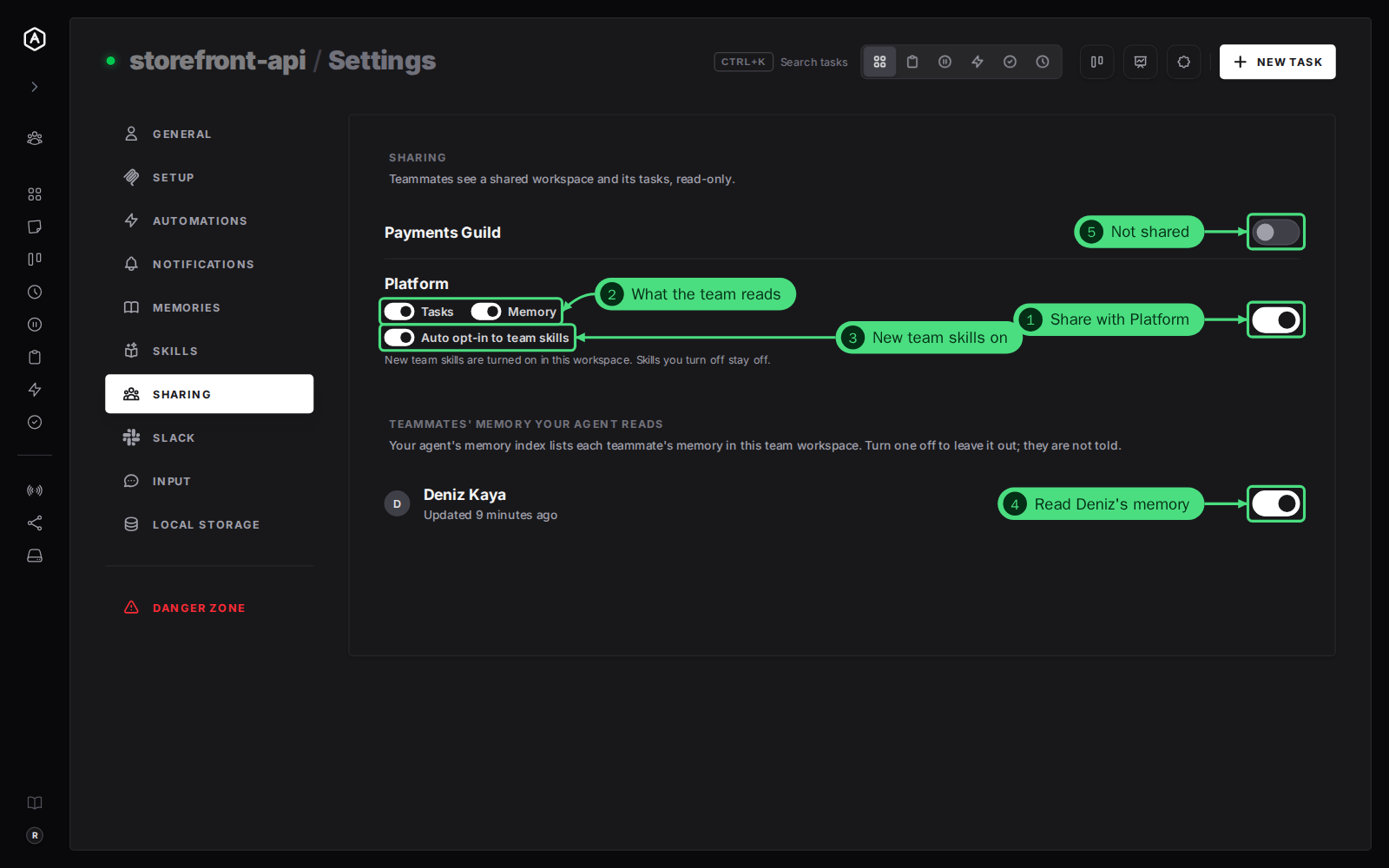
1. Turn on the switch at the end of a team's row to share the workspace with it. Turning it off asks first: teammates stop seeing the workspace and its tasks at once.
2. Choose what the team reads. A shared row gets two switches: Tasks and Memory. Turn one off to hold that part back from the team. With Tasks off, the workspace's tasks leave the team's task list, board and analytics.
3. Auto opt-in to team skills. On, every new skill of the team workspace is turned on here as it comes. Skills you turn off stay off.
4. Teammates' memory your agent reads. Each teammate who shares a workspace of the same name is listed. On, your agent's memory index lists their memory, so it learns from what their agents wrote down. Turn one off to leave it out; they are not told.
5. A team you have not shared with has just the switch, off.
Every switch saves as you flip it.
How Team Workspaces Work
A workspace shows up in the team under its own name. Your storefront-api and a teammate's storefront-api become one team workspace, with both of your agents' tasks in it. That is why the memory list shows teammates who share a workspace with the same name.
FAQ
Can teammates change my workspace or its tasks?
No. They see it read-only. They can clone a task into a workspace of their own.
Does a fork have its own sharing?
No. A fork follows its parent, so its row says Shared with parent and has no switch.
Where else can I change this?
In the team's settings, Your workspaces lists every workspace of yours with its on and off switch. The Tasks and Memory switches are only here. The team guidelines cover the rest.