
Start an Agent Task From Any Webhook
To start an agent task from anything that can send an HTTP request, register AgentRQ's built-in generic hook, route its request.received event to an event of yours, and have the sender POST to the payload URL with the registration's token in the Authorization header. The request body becomes the event's payload, so the task's instructions carry whatever the sender said. A retry with the same Idempotency-Key never makes a second task.
This page is one of our Hooks guidelines. It follows the Hooks docs and was checked against AgentRQ v0.19.6 on November 26, 2026. The example is a nightly backup job that tells the agent in ops when it fails.
When to Use It
- → A step in a CI pipeline that is not GitHub Actions.
- → A monitoring or alerting tool with a webhook action.
- → A cron job, a backup script or a deploy script.
- → An internal form or bot.
- → Any service whose webhooks can carry a fixed secret in a header of your choice.
If the service signs its requests in its own way and can't send a token in a header, write your own hook on a self-hosted server.
Before You Start
- → A workspace with an agent connected, here ops.
- → An event with a trigger that files the task in it, here
backup_failed. Open Events, click + New Event, then + Add trigger, and put{{EVENT_PAYLOAD}}in the instructions, for example "The nightly backup reported a problem. Find out why and fix it. {{EVENT_PAYLOAD}}". The GitHub guide shows these screens. - → A server the sender can reach. Self-hosted on a private network, a sender inside that network can reach it as it is. Otherwise see make the payload URL reachable.
Step by Step: Register the generic Hook
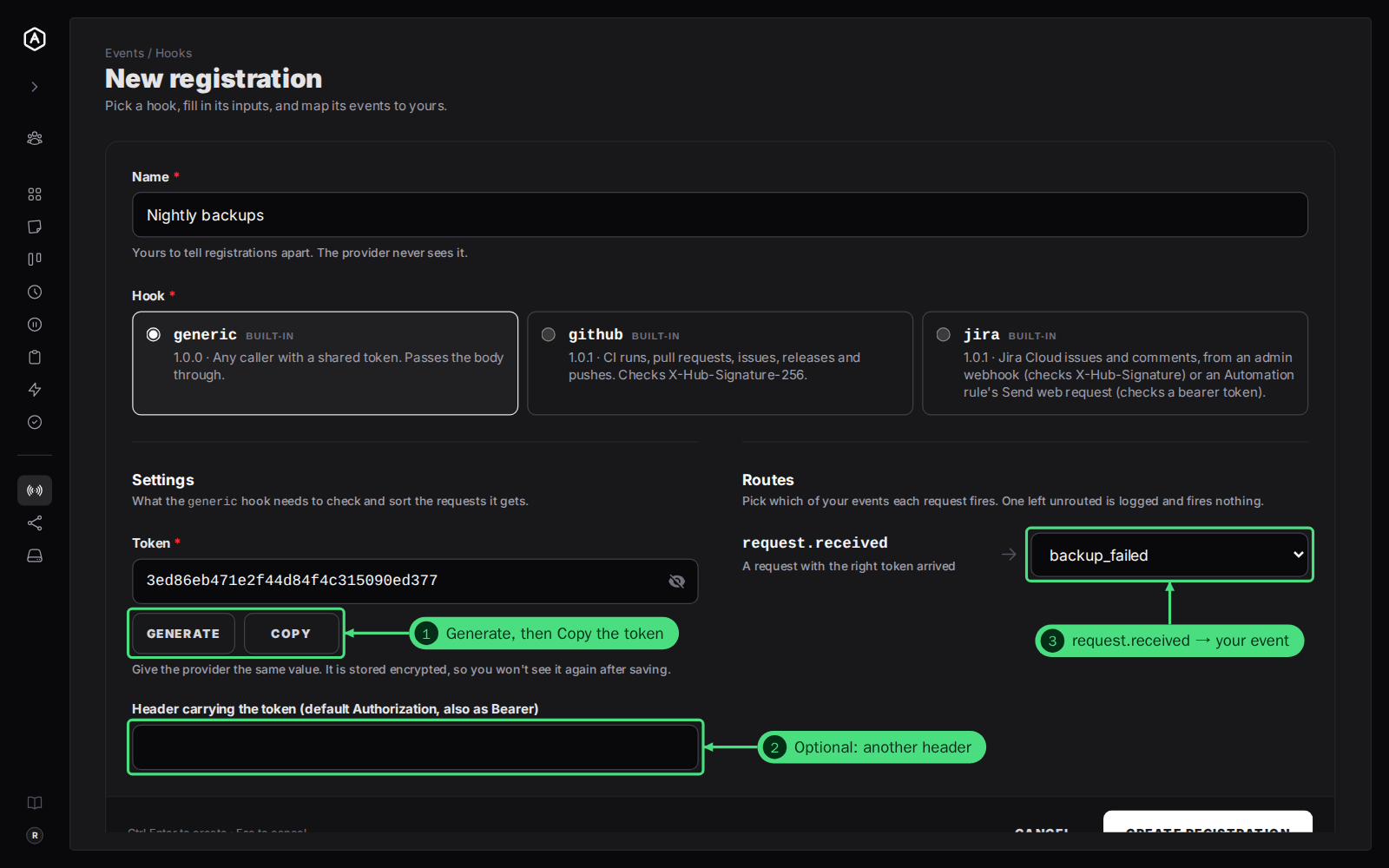
Open Events → Hooks and click New registration. Name it, for example Nightly backups, and pick the generic hook.
1. Click Generate, then Copy the Token. The sender needs it, and it is never shown again.
2. Header, optional. It names the header that carries the token. Left empty, it is Authorization, as the token itself or as Bearer <token>. Set it when the sender can only send a header of its own, such as X-Backup-Token.
3. Route request.received to your event, here backup_failed.
4. Click Create registration, then Copy URL. The full payload URL, with its ?agentrq_hook_token=…, is shown this once only.
Send a Request
With the payload URL in HOOK_URL and the token in HOOK_SECRET:
The server answers 202 Accepted at once, and within a few seconds a task appears in ops with the body in its instructions. A few things to know about each part:
- → The URL carries the hook token, which picks the registration. A missing or wrong one answers 404.
- → The Authorization header carries the registration's Token, which the hook checks. A wrong one is rejected, but the sender still gets 202: look in Deliveries.
- → The body can be anything. A valid JSON body is passed through as JSON; anything else is passed as text. The server caps an event payload at 64 KiB by default.
- → Idempotency-Key, or X-Request-Id if it is missing, marks a request as the same one. A second request with the same key is recorded as duplicate and fires nothing, so a sender that retries never makes two tasks. Use the run's id, not a timestamp.
In a script that should only call when something goes wrong:
Check What Happened
Open the registration in Events → Hooks. Its Deliveries list shows each request, and what the hook made of it:
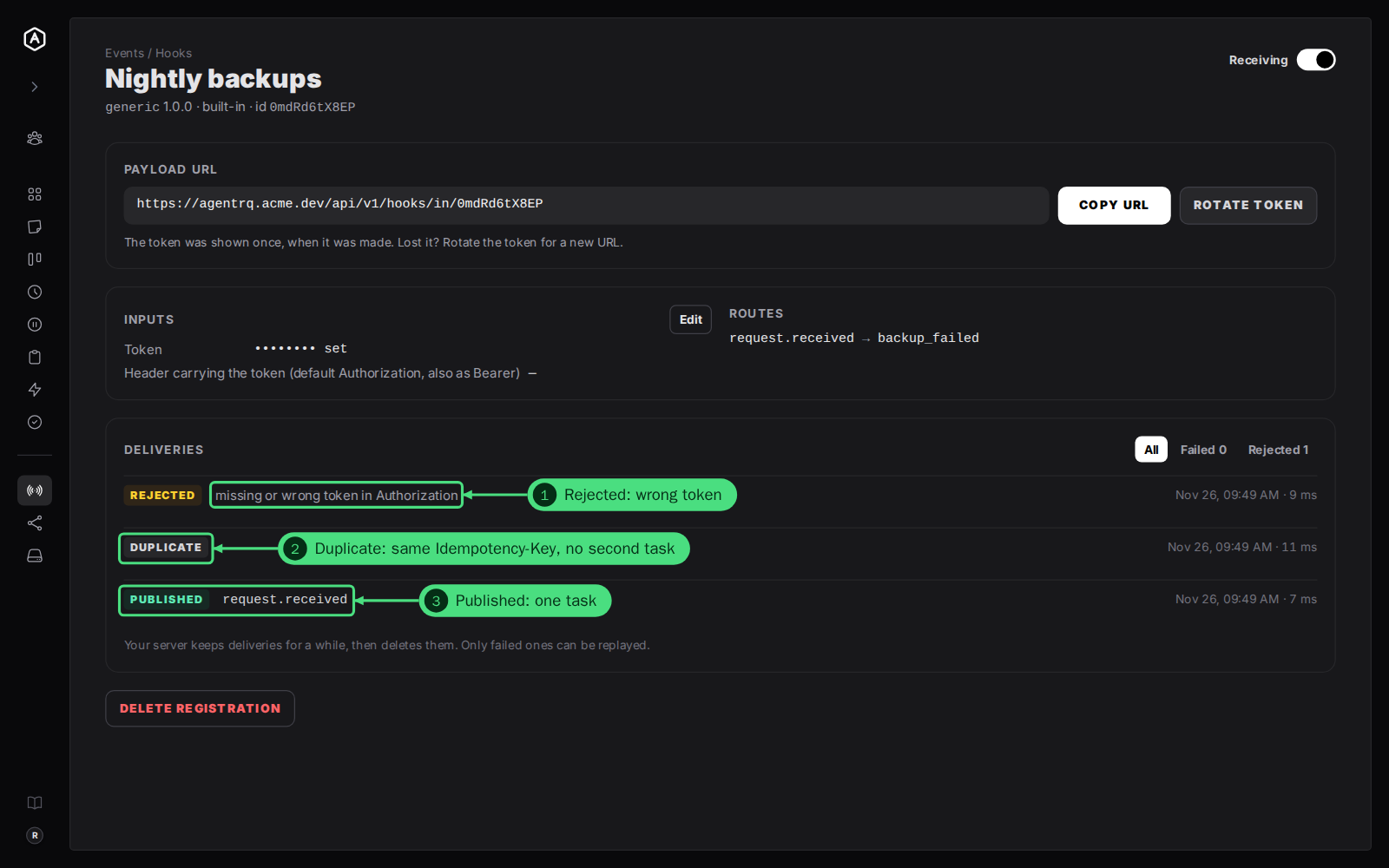
1. Rejected: the token was wrong or missing, and the reason names the header the hook looked in.
2. Duplicate: a second request with an Idempotency-Key it had already seen.
3. Published: the request was accepted and request.received fired, so the trigger filed the task.
Check hook deliveries explains every status, Replay and Rotate.
FAQ
Can one generic registration feed several workspaces?
One registration has one route for request.received, to one event. That event can have triggers in several workspaces, and each files its own task. For different senders, make one registration each: each gets its own URL and token, and you can rotate one without touching the others.
Can the sender pick the task's title?
The title comes from the trigger. Put what changes, such as the job's name, in the body, and the agent reads it from the instructions.
Is the token safe in a CI log?
Keep both the URL and the token in the CI system's secrets, never in the script. If one leaks, Rotate gives the registration a new URL at once, and the old one answers 404.
What if the sender can't add headers?
The hook needs the token in a header, because the URL alone can be guessed or logged. If the sender can't add one, write your own hook that checks what it can send, such as a signature.