
Turn GitHub Issues and CI Failures Into Tasks
To give an agent a task whenever something happens in a GitHub repository, create an event with a trigger that files the task, register the built-in github hook and route the GitHub event to yours, then add the hook's payload URL and secret as a webhook in the repository. This guide sets it up for new issues. The same steps work for failed CI runs, pull requests, releases and pushes.
This page is one of our Hooks guidelines. It follows the Hooks docs and was checked against AgentRQ v0.19.6 on November 26, 2026.
What the github Hook Can Fire
The hook checks GitHub's X-Hub-Signature-256 signature against your webhook secret, then fires one of these events. Tick the matching GitHub event when you add the webhook.
| Hook event | When | GitHub webhook event to tick |
|---|---|---|
| issue.opened | An issue was opened | Issues |
| pr.opened | A pull request was opened | Pull requests |
| pr.review_requested | A review was requested on a pull request | Pull requests |
| ci.failed | A GitHub Actions workflow run finished with failure or timed out | Workflow runs |
| ci.succeeded | A GitHub Actions workflow run finished with success | Workflow runs |
| release.published | A release was published | Releases |
| push | Commits were pushed to a branch | Pushes |
Before You Start
- → A workspace whose agent knows the repository's code, here storefront-api, with an agent connected.
- → Admin access to the GitHub repository, to add a webhook.
- → A server GitHub can reach. On agentrq.com it can. Self-hosted, see make the payload URL reachable.
Step 1: Create the Event
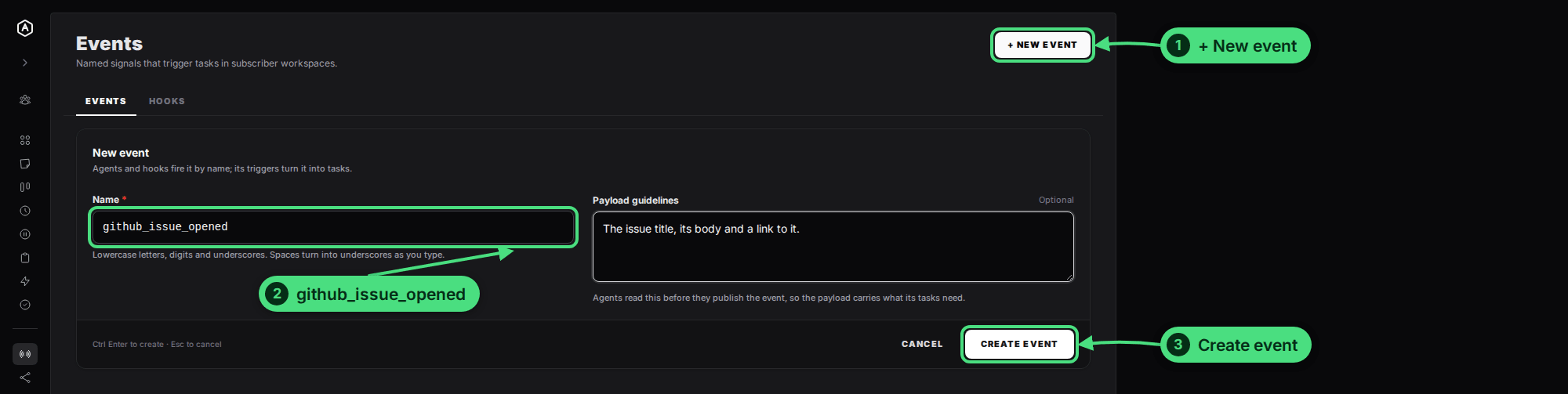
An event fires the tasks its triggers describe, so set it up first. Open Events in the sidebar.
1. Click + New Event.
2. Name it github_issue_opened. Event names are yours: pick one that says what happened.
3. Click Create event.
Step 2: Add a Trigger to It
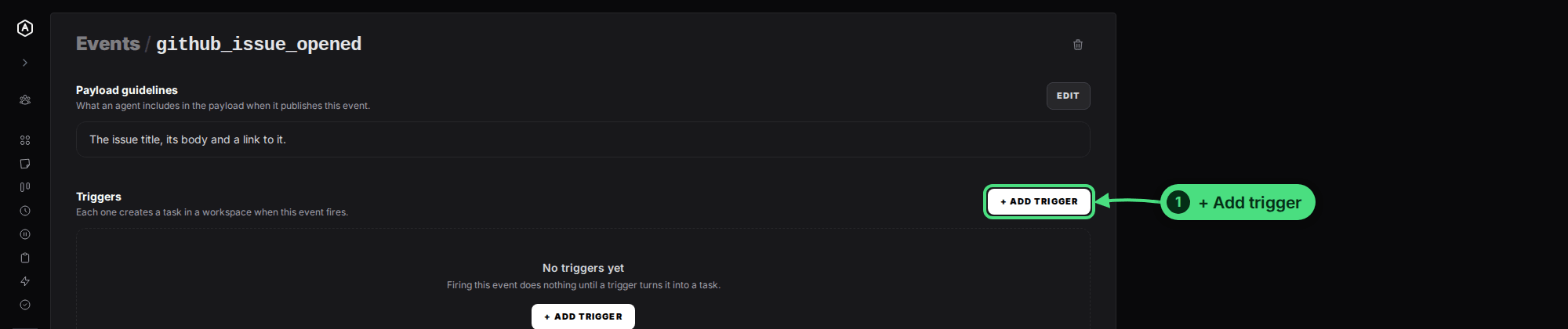
A trigger says which workspace gets the task and what the task says. On the event's page:
1. Click + Add trigger.
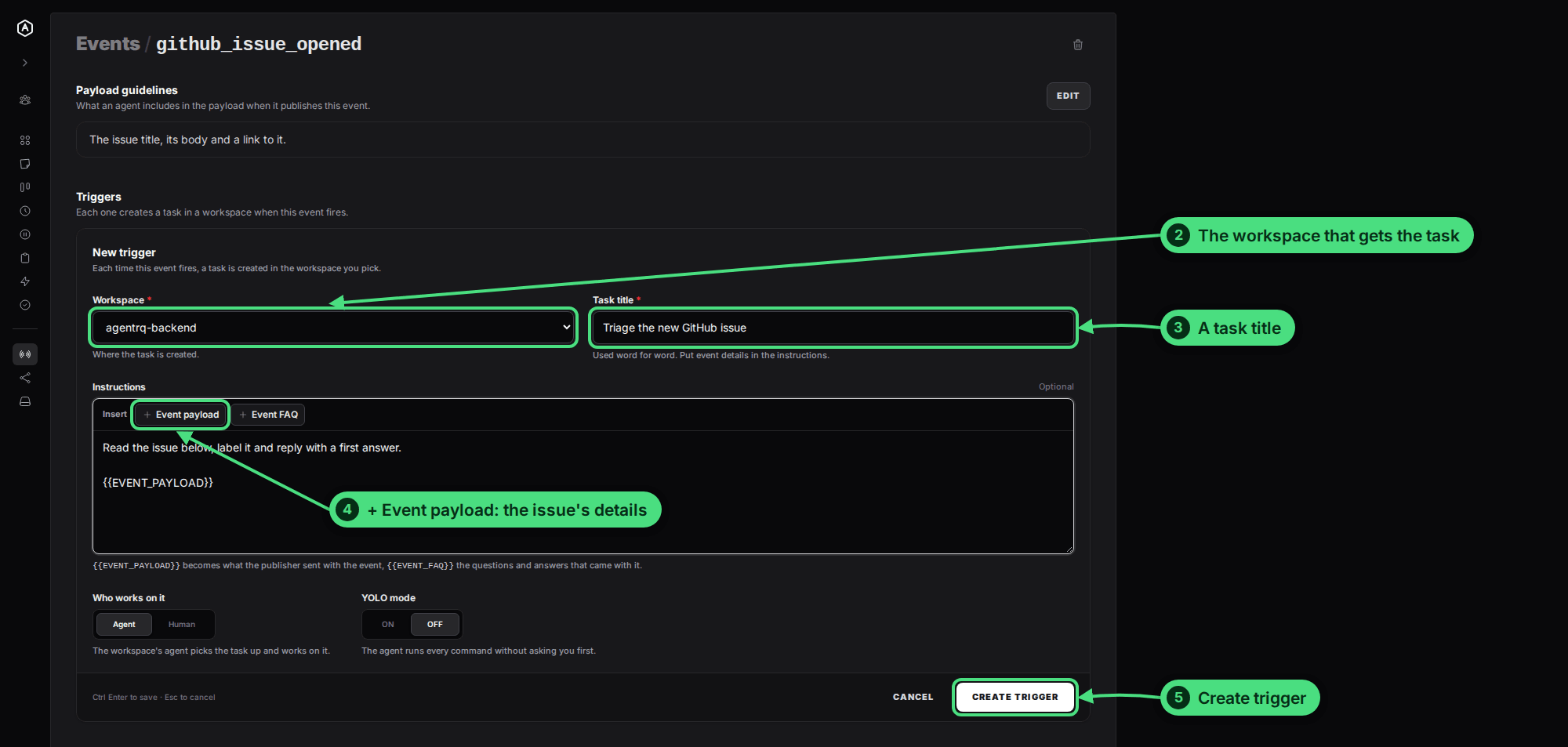
2. Pick the workspace that gets the task, here storefront-api.
3. Write a task title, such as "Triage the new GitHub issue". Every task gets this title word for word: the issue's own title is in the details.
4. Click + Event payload. It puts {{EVENT_PAYLOAD}} in the instructions, which becomes the issue's title, body and link when the task is made. Write what the agent should do around it, such as "Read the issue below, label it and reply with a first answer."
5. Click Create trigger. Leave Who works on it on Agent, and YOLO mode off unless you trust every request this hook will get.
Step 3: Register the github Hook
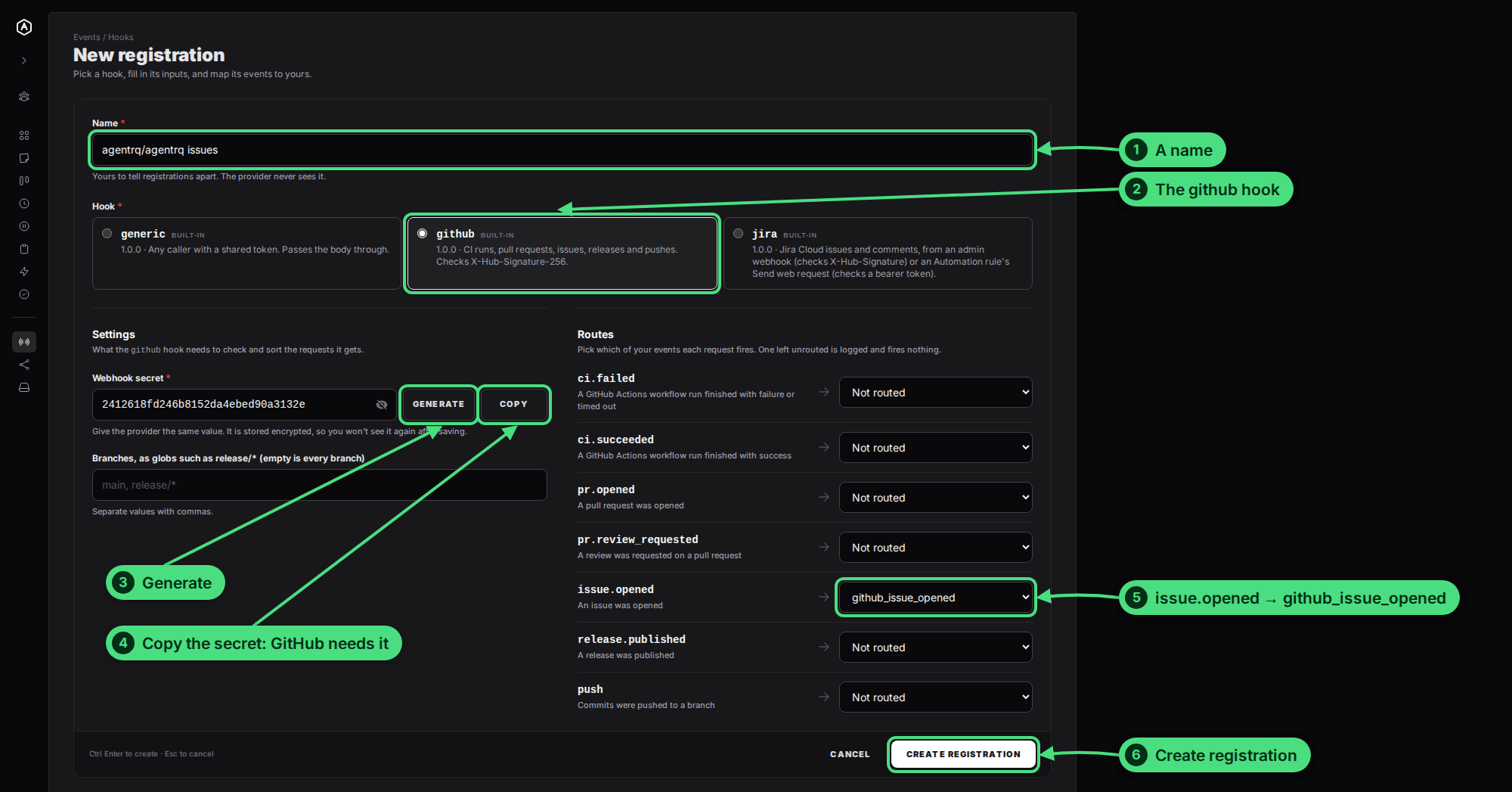
Open Events → Hooks and click New registration.
1. Name the registration, such as the repository's name. GitHub never sees it.
2. Pick the github hook.
3. Click Generate to make a random webhook secret.
4. Click Copy. GitHub needs the secret, and AgentRQ stores it encrypted and never shows it again.
5. Route issue.opened to github_issue_opened. Leave the other events Not routed.
6. Click Create registration.
Branches takes globs such as main or release/*. It limits CI runs, pull requests and pushes to matching branches; left empty, every branch counts. A * does not cross a /, so release/* matches release/1.2 but not release/1.2/hotfix.
7. Click Copy URL. The page now shows the registration's payload URL. It ends in ?agentrq_hook_token=…, and this is the only time the full URL is shown. Copy all of it, token included. If you lose it, rotate the token for a new one.

Step 4: Add the Webhook in GitHub
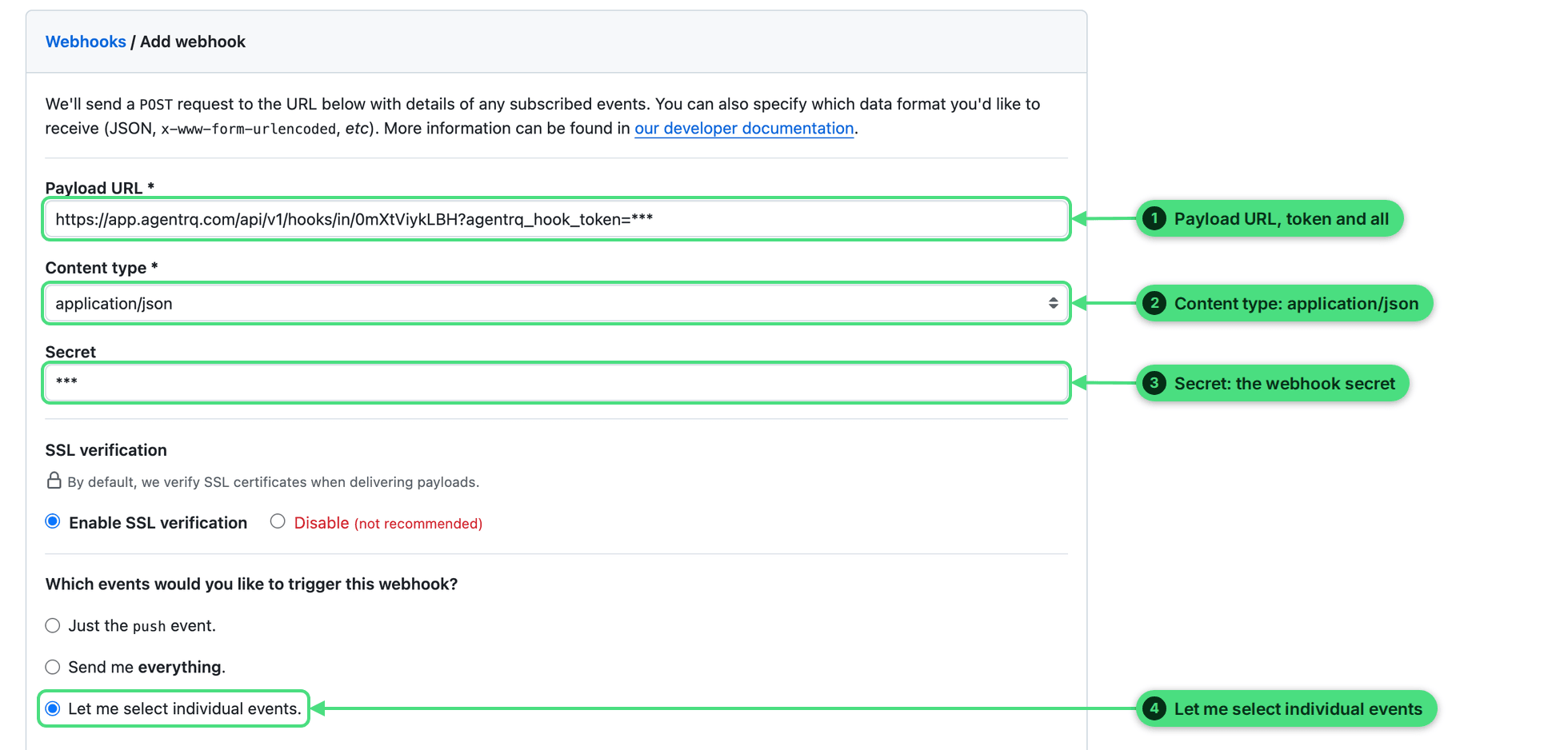
In the repository, open Settings → Webhooks → Add webhook.
1. Payload URL: the URL you copied, with its agentrq_hook_token.
2. Content type: application/json. GitHub's default, application/x-www-form-urlencoded, is rejected.
3. Secret: the webhook secret from step 3. It is not the hook token.
4. Choose Let me select individual events.
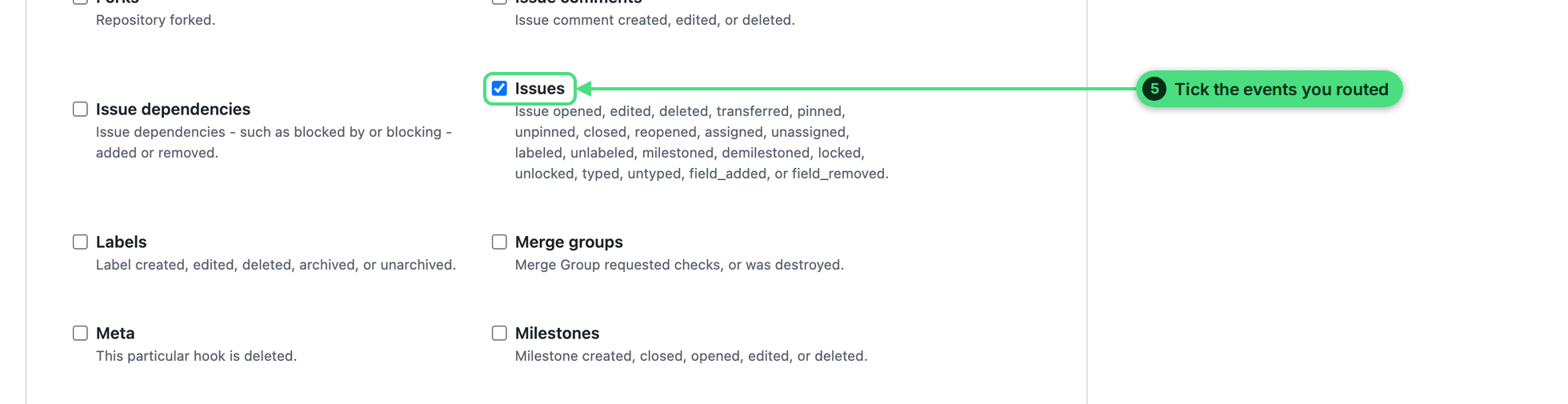
5. Tick the GitHub event for each route: Issues here. Use the table above for the others.
6. Click Add webhook.

Try It
Open an issue in the repository. Within a few seconds a task titled "Triage the new GitHub issue" appears under Not started in storefront-api, with the issue in its instructions, and the agent picks it up.
GitHub also sends a ping when you add the webhook. It shows up as ignored in the registration's Deliveries, because no event is routed for it. That is expected, and it proves GitHub can reach your server. If no task appears for the issue, read check hook deliveries: a rejected delivery names the reason, such as a secret that does not match.
More Things to Route
- → ci.failed → a "fix the build" task. Point the trigger at the workspace that owns the pipeline, and add Branches
mainso only failures on main start work. - → pr.review_requested → a review task. The agent reviews the pull request and replies, and you decide whether to merge.
- → release.published → a release-notes task in a docs workspace.
One registration can route several events, each to a different event of yours, and each event can have triggers in several workspaces. The Dependabot alerts post shows three more ways to wire GitHub to an agent.
FAQ
Is the webhook secret the same as the hook token?
No. The secret is what GitHub signs each request with, and the hook checks the signature. The token is the agentrq_hook_token part of the URL, which tells AgentRQ which registration the request is for. GitHub needs both: the token inside the URL, the secret in the Secret field.
Can one registration serve several repositories?
Yes. Add the same payload URL and secret as a webhook in each repository, or once as an organization webhook. The task's details name the repository.
Why did a retry not create a second task?
GitHub sends each delivery with an id, and the hook uses it to drop repeats. A redelivery shows up as duplicate in Deliveries and fires nothing.
Can the agent comment on the issue?
The hook only reads from GitHub. For the agent to comment, label or open a pull request, give the workspace access to GitHub, such as the GitHub CLI or the GitHub MCP server, and say so in the trigger's instructions.