
How to Enable YOLO Mode in Cline
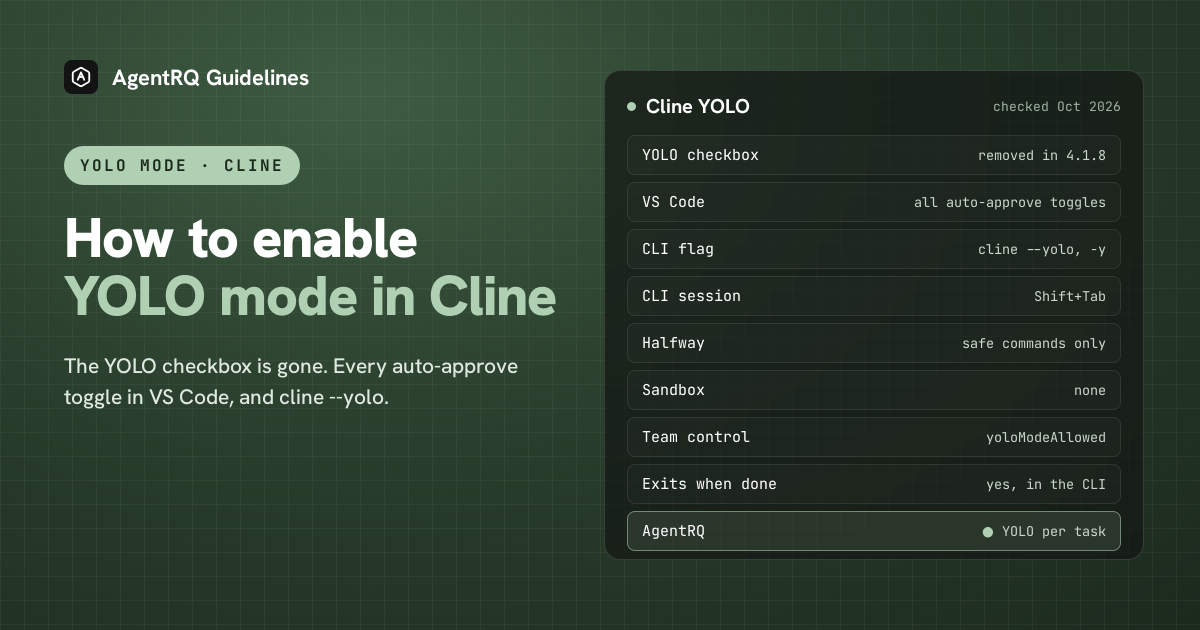
Cline's VS Code extension no longer has a YOLO checkbox. To get the same result now, turn on every toggle in Cline's auto-approve menu. In the Cline CLI, YOLO mode is still a flag: cline --yolo, or -y.
This page is one of our YOLO mode guides, and part of our guide to YOLO mode in every coding agent. Everything below was checked against the Cline source (cline/cline: extension 4.1.23, CLI 3.0.69), its changelog and docs on October 7, 2026.
Where Did Cline's YOLO Mode Go?
Cline used to have a YOLO mode checkbox in its settings. Version 4.1.8 removed it, and the changelog explains why: it was "cosmetic: nothing in the approval path read it". What actually approved things were the auto-approve toggles. If you had the old checkbox on, Cline migrated you to having every auto-approve action turned on, which is what YOLO meant in practice.
Some of Cline's own documentation pages still tell you to "check YOLO Mode" under Settings and Features. That checkbox is no longer there.
What YOLO Mode Turns Off in Cline
YOLO in Cline means no approval prompts: Cline reads and edits any file, runs any command, uses the browser and MCP servers, and moves from Plan to Act without stopping.
Cline has no sandbox to turn off. Its CLI has a "sandbox mode" (--data-dir, or CLINE_SANDBOX=1), but that only keeps Cline's own state in a separate directory. It does not isolate the commands Cline runs. Cline's docs recommend a container for YOLO-style use.
How to Enable YOLO Mode in the Cline Extension
| Where | Full YOLO | Halfway |
|---|---|---|
| VS Code | every auto-approve toggle on | some toggles, such as safe commands only |
| CLI | cline --yolo or -y |
--auto-approve |
| CLI session | Shift+Tab | Shift+Tab |
Open the Cline panel in VS Code and find its auto-approve menu in the chat area. Turn on all of these:
- → Read project files, and read all files
- → Edit project files, and edit all files
- → Execute safe commands, and execute all commands
- → Use the browser
- → Use MCP servers
With all of them on, Cline asks you nothing. This is Cline's YOLO mode today.
The Halfway Option: Pick Your Toggles
The usual middle ground is to turn on reading and editing project files and Execute safe commands, and leave Execute all commands off. Cline's model marks each command as needing approval or not, and only the ones it marks safe run on their own. There is no fixed allowlist of commands, so read the commands it asks about and decide whether to widen the toggles.
How to Enable YOLO Mode in the Cline CLI
-y is the short form. In YOLO mode the CLI skips every approval, turns off the tools that spawn other agents, and exits when the task is finished, which makes it fit for scripts and CI. It is not saved anywhere, so it only applies to that run. Since CLI 3.0.69, cline --help lists it with a warning to use it only in sandboxed environments.
In the CLI's interactive interface, Shift+Tab turns "auto-approve all" on and off, and Tab switches between Plan and Act.
The CLI also has --auto-approve true|false. Its help says a prompt runs in act mode with auto-approve enabled by default, which surprised us. If you run Cline unattended, pass --auto-approve false explicitly whenever you want it to ask.
Teams can stop anyone using YOLO with the remote config setting yoloModeAllowed: false.
How to Enable YOLO Mode in Cline Through AgentRQ
Cline's own YOLO switch covers a whole session. AgentRQ lets you make the decision per task, and answer from somewhere other than the terminal.
Approve From the AgentRQ Task Instead of the Terminal
Connect the Cline CLI to an AgentRQ workspace through the ACP Gateway (Cline setup guide):
This covers the Cline CLI. The VS Code extension keeps its own auto-approve menu.
Then start it without --yolo. In ACP mode Cline starts with auto-approve off, so its requests come through to you. Each permission request now shows up in the AgentRQ task on the web, on your phone or in Slack, together with the command or edit it is asking about. Answer Allow Once, Always Allow or Deny from wherever you are, and Cline carries on. If nobody answers within 30 minutes, the gateway cancels the turn instead of guessing. Change the limit with --permission-timeout.
Turn On YOLO for One Task
Flip the YOLO toggle on a task, or when you create it, to put just that task in YOLO mode. Every permission request in it is approved automatically and Cline never waits, while every other task in the workspace still asks. Scheduled tasks, event triggers and workflow steps have the same switch, so an unattended job can run in YOLO while your interactive work stays supervised.
A Safe YOLO Setup for Cline
- → Allow the boring tools, not everything. Always Allow adds the tool to the workspace's auto-approved list, so the routine calls stop asking and the risky ones still do. Prune that list in workspace settings now and then.
- → Leave the workspace-wide switch off. Workspace settings also has YOLO Mode (Execute All). Turn YOLO on per task instead, so it never outlives the job you trusted.
- → Bring your own sandbox. Cline has no OS sandbox, so run YOLO tasks in a container, a dev VM or a throwaway clone.
- → Commit first. Start every YOLO task from a clean git tree, so any change is one
git resetaway. - → Read the record. The tool call history lists every call the task made, including the ones that were auto-approved.
FAQ
Where is the YOLO mode setting in Cline? It was removed in version 4.1.8. Turn on every toggle in the auto-approve menu instead.
How do I enable YOLO mode in Cline? In VS Code, turn on all the auto-approve toggles: read, edit, execute all commands, browser and MCP. In the CLI, run cline --yolo.
What is cline --yolo? The Cline CLI flag that skips every approval, turns off sub-agent spawning and exits when the task is done. -y is the short form.
Does Cline have a sandbox? No. Cline's sandbox mode only isolates its own data directory. Run YOLO sessions in a container.
What is the safest Cline auto-approve setting? Read and edit project files plus execute safe commands, with execute all commands off.
How do I approve Cline commands remotely? Connect the Cline CLI to AgentRQ through the ACP Gateway. Its permission requests show up in the task on the web, your phone or Slack.
For every other agent, see what YOLO mode is and how to turn it on in every coding agent.