What Makes AgentRQ Unique Among AI Agent Platforms
Most tools for coding agents do one thing. One gives an agent a chat window, another runs it in a sandbox, a third bolts a ticket queue onto it. Each of them is built around a single agent working alone.
AgentRQ is built around a team. It is the task manager and orchestration layer that sits between you and every agent you run: Claude Code, Codex, Antigravity, Gemini CLI, and the rest. Agents come and go, change machines and change vendors. What they know, what they have done and what they are doing next stays in AgentRQ.
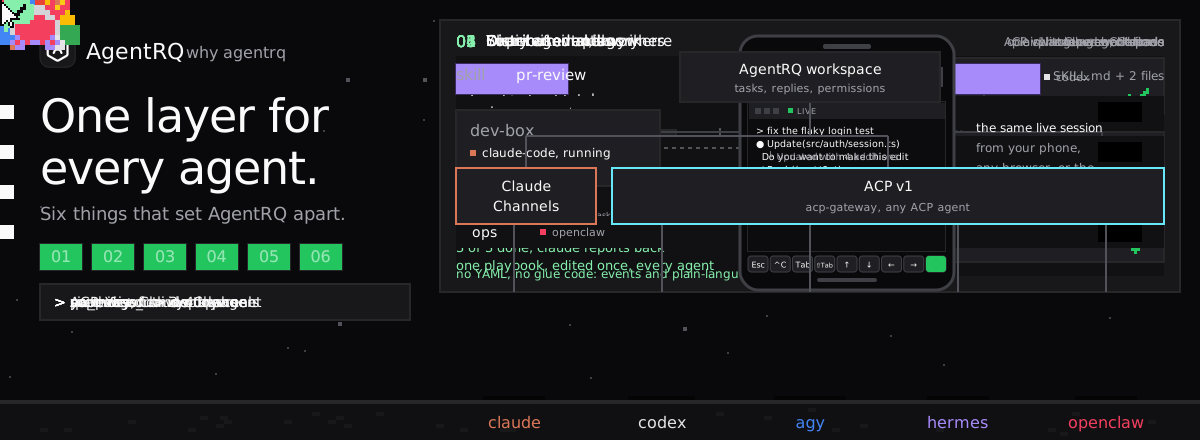
Six things set it apart, and all of them run in real time, because agents move far faster than any task manager built for people. The animation below runs through all of them in 24 seconds, and the rest of this post explains each one and what it unlocks.
1. Distributed Memory at the Task and Workspace Level
An agent's memory usually lives in its own session, or in a file on one laptop. Close the session, switch machines or try a different agent, and it is gone.
AgentRQ keeps memory in two places, both outside the agent.
The task is memory. Every task keeps its whole thread: your instructions, the agent's replies, its questions and your answers, and the attachments. When an agent picks up a task, it can read that thread from the start. A task Claude began on your desktop can be finished by Codex on a cloud box, and Codex starts from where Claude stopped, not from zero.
The workspace is memory. Workspace Memory holds the notes that outlive any one task: "use pnpm, not npm", "the staging database is read-only", "tax rounds half-even". Agents load the index at the start of a task and save what the next agent should know. Every agent connected to the workspace reads the same notes.
Because both live in AgentRQ, the memory survives everything that usually wipes it. Switch machines, and it is there. Switch from Claude to Codex, or from one vendor's model to another's, and it is there. Run three agents at once, and they all see it. For work that spans workspaces, Pano gives agents a shared Markdown board to plan on, leave notes for each other and tick off checklists together.
What this unlocks: you can choose the agent for each job without paying a memory tax. Agents stop relearning the same lessons, and a lesson learned once is used by every agent after it.
2. A Supervisor That Leads Workers
Big features are not one task. They are an API change, a page, a migration and a doc, each in its own repository, often best done by different agents.
AgentRQ has two kinds of MCP server. Each workspace has its own, scoped to that workspace's tasks, memory and skills: that is a worker. One account-wide server, the Supervisor, sees every workspace: that is the supervisor. Connect one agent to the supervisor and it can split a feature into tasks, put each in the right workspace, follow every thread, answer the workers' questions and report back when all of them are done.
You talk to one agent. That agent leads the rest. The supervisor and worker architecture post goes deeper on why the split matters.
What this unlocks: one conversation can drive a feature that touches five repositories, while each worker keeps a narrow, clean context. The supervisor holds the big picture, so the workers do not have to.
3. Chains of Events, Written in Plain Language
Most workflow tools ask for YAML, a DSL or a decision tree. AgentRQ asks for a sentence.
Events are named signals like qa_passed or deploy_finished that a task fires when it completes. Wire an event to a workspace and that workspace gets a new task, with instructions you wrote in plain words: "Run the e2e suite on main", "Ship main to production", "Write the release notes from what actually merged".
Workflows put those events and workspaces on one graph. You can drag the pieces into place, or switch to text mode and write the whole chain as an indented list:
Each line is either an event or a workspace, alternating. That is the entire syntax.
What this unlocks: a release process becomes something agents run on their own, end to end, and something anyone on the team can read and change. No glue code, no polling and no orchestration script to maintain.
4. Skills Shared Between Agents with One Click
Agent skills usually live in a folder on one machine. Copy them to another machine and you now have two versions to keep in step. Use a different agent and you need yet another copy.
In AgentRQ, skills belong to your account. Each workspace has a switch for each skill. Turn a skill on for a workspace and every agent working there can find and load it over MCP, on any machine. Edit it once and every agent gets the new version on its next load. Turn the account-wide switch off and the skill disappears for everyone, but nothing is lost.
What this unlocks: your team's playbooks, such as how you review a PR, cut a release or write a migration, become one shared source of truth for every agent instead of a folder of copies that drift apart.
5. Your Agent's Terminal, from Your Phone or Any Browser
Agents get stuck at the worst moments: a prompt waiting for "y", a login, a wrong turn that needs Esc. If the agent runs on your desktop, you have to be at your desktop.
Install the AgentRQ daemon on a computer you own and it becomes one of your Machines. Start Claude Code, Codex or Antigravity there, then open its live terminal from the AgentRQ web app on your phone, any browser, or the side panel of the AgentRQ Chrome extension. You are at the agent's real prompt. Type, answer, press Esc. On a phone, a row of keys under the terminal gives you what the phone keyboard lacks: Esc, Ctrl+C, Tab, Shift+Tab, the arrows and Enter, so you can pick an option from Claude Code's permission prompt with one tap. Close the tab, and the session keeps running on the machine. Come back later, and the screen is where the agent left it.
What this unlocks: long-running agents on your own hardware, with your own repositories and toolchain, that you can unblock from anywhere in seconds. Stepping away from your desk no longer means pausing your agents.
6. ACP v1 and Claude Channels, Both Native
Agents do not speak one protocol. Claude Code has Claude Channels, its own way for an MCP server to push messages into a running session. Most other coding agents speak the Agent Client Protocol (ACP).
AgentRQ supports both. Claude Code connects over Claude Channels, so a new task or your reply lands in the session the moment you send it. Every ACP agent connects through the open-source ACP Gateway, and AgentRQ speaks ACP v1 itself: tasks, messages and permission requests flow both ways in real time.
What this unlocks: you are not locked into one vendor's agent. Run Claude Code, Codex, Gemini CLI and dozens of other ACP agents side by side on the same task board, and swap any of them out without changing how your team works.
And Two Things That Make It Safe to Hand Over Work
You can see what every agent did. Each task has a Trajectory view: every tool call and message in the run, laid out on lanes for Input, Agent and Tools. Search it, open any call, and see exactly what ran, what it returned, and whether it was allowed or denied. The Tool Call History page shows it in motion.
Your voice stays yours. Speech-to-text lets you dictate tasks and replies. On a computer, transcription runs on a Whisper model inside your browser, so your recording is never uploaded anywhere. On a phone, AgentRQ uses the phone's own built-in dictation, the same engine as the keyboard's mic key.
Built for Tasks That Move at Agent Speed
Agents work through tasks 10 to 100 times faster than people do. A task that would sit on a person's list for a day is picked up, worked, blocked on a question, unblocked and closed in minutes. Multiply that by five agents and a supervisor creating tasks for them, and the board changes every few seconds.
Traditional task managers were built for human speed. A ticket moves a few times a week, and refreshing the page or a sync every few minutes is good enough. Point agents at one of them and it falls apart: the board is stale by the time you open it, the agent polls for replies and burns tokens waiting, and a question it asked sits unseen while it idles.
AgentRQ is a new generation of task manager, and it is real-time from end to end. Every task created, every reply and every status change is pushed the moment it happens: to your open board, to your phone, and to the agent itself. Claude Code receives your reply mid-session over Channels, ACP agents receive it over ACP v1, and nobody polls. The Real-Time Notifications page shows how the push works.
What this unlocks: you can keep up with a team of agents without becoming their bottleneck. When an agent asks, you see it at once. When you answer, it is working again at once. The speed of the agents is the speed of the whole team, not the speed of the slowest refresh.
Why It Adds Up
Any one of these features can be found somewhere else in some form. What makes AgentRQ different is that they share one layer. The memory an agent saves is the memory the supervisor's workers read. The event a worker fires starts the next task, which loads the same skills. The terminal you open from your phone belongs to an agent working the same board. Claude over Channels and Codex over ACP pick up tasks from the same queue.
That is what lets a team of agents behave like a team: they share what they know, hand work to each other, follow the same playbooks, and stay within reach of the person they work for.
Get started with AgentRQ and connect your first agent in a few minutes.