Who Owns What? Managing Coding and Research Agents
It starts well. One agent writes code, another researches competitors, a third drafts the docs. A week later the questions change. Who took the pricing research? Did the migration go to Codex or to Claude? Is anyone still on the flaky test, or did two agents both pick it up? The research came back on Tuesday: whose job was it to turn it into code?
None of those questions is about how smart the agents are. They are about ownership, and most teams answer them from memory, chat history and a lot of terminal windows.
That is the question behind this post: we're running multiple agents for coding and research but can't track who owns what. What agent management tools let us assign roles and set clear ownership?
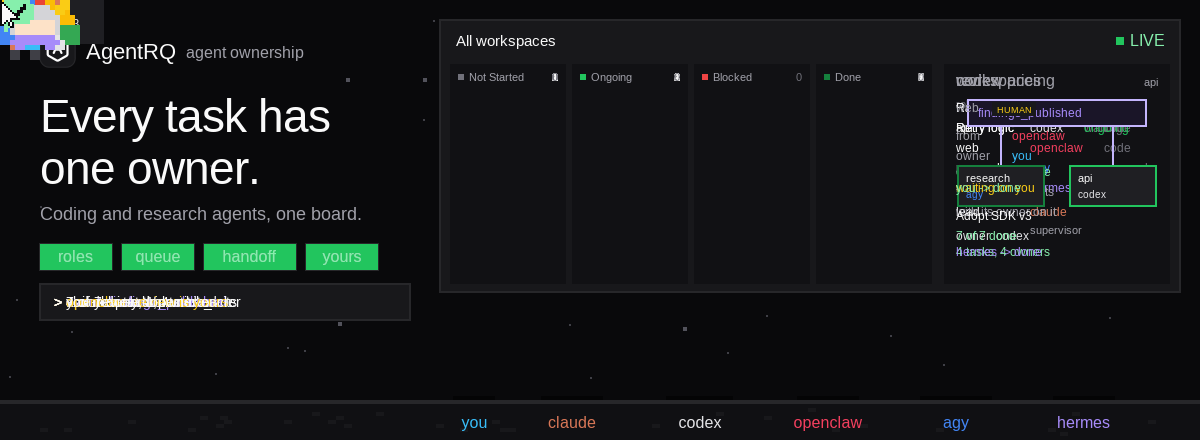
The short answer: pick a tool where a role is a real place with its own instructions, every task has exactly one owner, agent or human, and a hand-off from one role to the next creates a new task with a new owner instead of a message someone has to remember. AgentRQ is built that way. Each role is a workspace, every card on the task board shows its workspace and its owner, an agent works on one task at a time, and events hand finished research to the coding workspace as a new task. It works with Claude Code, Codex, Gemini CLI and the other agents that speak ACP, side by side.
Why Ownership Gets Lost
Coding agents and research agents fail at ownership in different ways, and a mixed team gets both.
Coding agents collide. Two agents in the same repository can pick up the same bug, edit the same file and both report success. Without one owner per task, you find out at merge time.
Research agents vanish into chat. A research run ends as a long answer in a chat window. Unless someone turns it into the next task, the finding has no owner, and the coding work it should start never starts.
Hand-offs live in your head. "When the research is done, have the API agent update the pricing endpoint" is a plan only you know about. If you are in a meeting when the research finishes, nothing happens.
Every vendor shows its own agents. Each agent vendor's dashboard shows that vendor's sessions. A team running Claude Code for code and Gemini for research has two dashboards and no single answer to "who is on what".
What to Look For
An agent management tool that settles ownership should let you answer five questions at a glance:
- What is each agent for? A role with its own instructions, memory and skills, not just a name in a prompt.
- Who owns this task? Exactly one owner on every task, and that owner can be a person.
- What is each agent doing right now? One task in progress per agent, so "busy" means one thing.
- What happens when this is done? The next step, and its owner, defined before the work finishes.
- Who did what? A history of each task's status changes and tool calls, so ownership can be checked after the fact.
How the Options Compare
| Option | Roles | One owner per task | Hand-offs | Works across agent vendors |
|---|---|---|---|---|
| A terminal or chat per agent | One window each | Only in your head | You copy and paste | Yes, but nothing ties them together |
| An agent framework with roles in code | Defined in code per run | Inside one run | Inside one run | Depends on the framework |
| An issue tracker you assign agents to | Labels and teams | Yes | You file the next issue | One integration per vendor |
| A vendor's agent dashboard | That vendor's agents | Partly | No | No |
| AgentRQ | A workspace per role | Every card shows workspace and owner, agent or human | Events create the next task in the next workspace | Any agent that speaks ACP or MCP |
Frameworks that give agents a role, a goal and a backstory are good at one run of a pipeline you wrote in code. Issue trackers that let you assign an issue to an agent are good at coding work that starts from a ticket. The gap is the day-to-day team: several agents from several vendors, research and code mixed, working for days, with people in the loop.
How AgentRQ Sets Roles and Ownership
A workspace is a role. Make one per responsibility: api and web for code, research and market for research. Each has its own working directory, a Mission Description that tells the agent what it is there for, its own memory and its own skills. The agent connected to a workspace sees that workspace's tasks and nothing else, so a research agent cannot wander into the API backlog.
Every task has one owner. A task belongs to one workspace, and the card on the board shows the workspace and the agent working there. A task can also be assigned to a human instead of the agent: a review, a decision, a login only you can do. It sits on the same board with you as its owner, so a hand-off to a person is as visible as a hand-off to an agent.
One task at a time per agent. Since AgentRQ v0.17.0 an agent works on one task at a time. The rest of its tasks wait in Not Started, already owned. When you look at the board, every agent has at most one task in progress, so you can tell what it is doing without asking.
Hand-offs are events, not reminders. When the research task finishes, it can publish a named event such as findings_published. Wire that event to the api workspace and AgentRQ files a new task there, owned by the agent in api, the moment the research is done. Workflows draw the whole chain as a graph, so the plan you used to keep in your head is a picture anyone can read.
A supervisor assigns, you approve. A supervisor agent can split a goal into tasks and file each one into the right workspace. Risky commands still stop for you as Authorization Required, as covered in our post on managing agents by role and responsibility.
The history proves who did what. The task timeline records every status change, and tool call history shows each command the owner ran. When someone asks why the pricing endpoint changed, you can follow it from the research task to the event to the coding task, owner by owner.
Teams show whose agent is whose. With Teams, teammates see each other's shared tasks live with the owner's name on each, so two people's agents stop picking up the same work. Our post on an agent control plane for teams running Claude Code covers that shared view in depth.
What This Unlocks
Research turns into work on its own. The most common way research is lost is that nobody owns the next step. When finishing the research files the coding task, the next step has an owner the moment the finding exists. You can be in a meeting and the work still moves.
Two agents stop doing the same job. One owner per task and one task at a time per agent remove the quiet duplication that wastes a day of agent time and ends in a merge conflict.
People become owners on the same board. Agents are good at most of the work but not all of it. With human tasks on the board, the review you owe is a card with your name on it, not a message lost in a thread. The board shows when the agents are waiting on you.
You can mix vendors without losing track. Claude Code in api, Codex in web and Gemini in research report to one board. You choose each agent for what it is good at without adding another dashboard to check.
Ownership survives the people who set it up. Roles, hand-offs and history live in AgentRQ, not in one person's head. A teammate covering for you reads the board and the workflow and knows who owns what.
Set It Up
- Create a workspace per role. Start with two or three: one per codebase your coding agents touch, and one for research. Write a short Mission Description for each.
- Connect one agent to each workspace. Pick the agent that fits the role. Each one now sees only its own tasks.
- File tasks into roles, not agents. Create tasks in the workspace that owns the work, or let the supervisor do it. Assign reviews and decisions to yourself.
- Wire the hand-offs. Give the research task an event to publish when it completes, and subscribe the coding workspace to it. Check the chain on the Workflows page.
- Watch the board. Every card shows its role and its owner. If something is in Not Started for too long, you can see whose queue it is waiting in.
FAQ
Can a task have more than one owner? No. A task belongs to one workspace and is assigned either to the agent working there or to a human. Split shared work into one task per owner and connect them with an event.
Can I move a task to a different owner? Yes. You can move a task to another workspace, and its new owner is the agent working there.
Do I need one agent vendor for this? No. Each workspace can run a different agent, and all of them report to the same board.
How is this different from assigning issues to an agent in our tracker? A tracker assigns a coding issue to one agent. AgentRQ gives each role its own instructions, memory and skills, keeps people and agents on one board, and creates the next task when the current one finishes, for research work as well as code.