An Agent Control Plane for Teams Running Claude Code
Monday morning, three engineers, nine Claude Code sessions. Priya has two in the API repo and one on a migration. Leo has three in the web app. Sam has a research session and two on billing. By Wednesday nobody can say for sure which session is on the flaky checkout test, whether Leo's agent and Priya's agent both touched the cart endpoint, or why a session has sat on a permission prompt since lunch. The answers exist, spread across nine terminals on three laptops.
That is the question behind this post: our team runs multiple Claude Code sessions and we're losing track of which agent is doing what. What agent control plane software can give us a shared view of all active work and who owns each task?
The short answer: you need a control plane that sits above the sessions rather than inside one of them. It should keep every piece of work as a task with exactly one owner, show every teammate's tasks on one live board, and bring every permission prompt and question to the person who has to answer it. AgentRQ is built for that. Each Claude Code session connects to a workspace, every job is a card on the task board showing its status, workspace and owner, and Teams puts everyone's shared workspaces on one board with each owner's name. Pending on Me lists everything waiting on you across all of them. It also runs Codex, Gemini CLI and other ACP agents next to Claude Code.
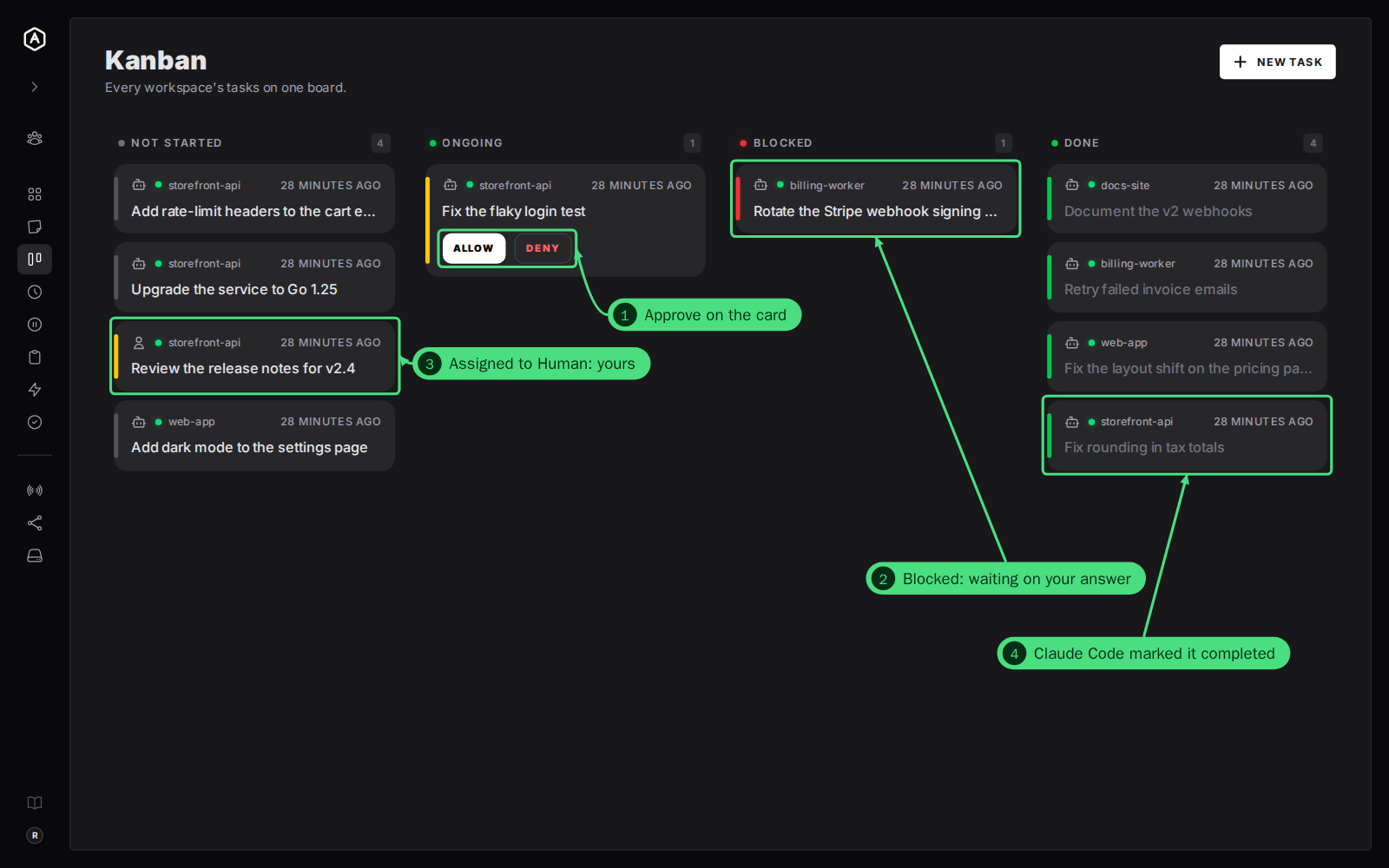
What an Agent Control Plane Is
In infrastructure, the data plane does the work and the control plane decides what work happens, where, and under whose authority. Agents split the same way. The Claude Code sessions are the data plane: they read code, run commands and open pull requests. The agent control plane is the layer that assigns them work, shows what each one is doing, holds their approvals and keeps a record of who did what.
A single developer can be the control plane in their head. A team can't. Once three people each run several sessions, "which agent is doing what" turns into a coordination problem, and the answer has to live somewhere everyone can see.
Why Teams Lose Track of Claude Code Sessions
A session is a terminal, not a record. Claude Code keeps its work in a terminal on one person's machine. Close the tab, and the only trace of what the session was asked to do is a git log and someone's memory.
Every dashboard stops at one laptop. Session managers that read local processes show the sessions on your own machine. Your teammate's sessions are on theirs, so there is still no shared view.
Ownership is implied, not recorded. "Leo's agent is on the cart endpoint" is something Leo said in standup. Nothing stops Priya's session from picking up the same file an hour later.
Prompts wait where nobody is looking. A session asking to run a migration waits in a terminal until its owner happens to look. Across a team, a lot of agent time goes to waiting.
Hand-offs fall between people. Sam's research session finds what the API should change. Unless someone files that as work for the API session, the finding stays in Sam's terminal.
What to Look For in Agent Control Plane Software
A control plane that fixes this should answer six questions at a glance, for the whole team:
- What is every session working on right now? Live, across every teammate's machines, not just yours.
- Who owns each task? Exactly one owner on every task, agent or person, with the teammate's name on it.
- What is waiting on me? Permission prompts and questions from every session, in one list, so you can act without opening terminals.
- What is queued next? Work waiting to start, already assigned to the session that will do it.
- What happened? A timeline of status changes and the tool calls behind them, kept after the session ends.
- Does it cover every agent we run? Claude Code today, and Codex or Gemini CLI the day a teammate prefers them.
How the Options Compare
| Option | Shared across teammates | One owner per task | Approvals in one place | History after the session | Agents beyond Claude Code |
|---|---|---|---|---|---|
| A terminal per session | No | Only in standup | No, one terminal each | Scrollback only | Yes, but nothing connects them |
| Claude Code agent view | No, the sessions on one machine | No | For your own sessions | Per session | No |
| Claude Code agent teams | Within one lead session | Teammates claim tasks from a shared list | Through the lead | Per team run | No |
| Local session managers | No, one machine | No | Partly | Partly | Some |
| An issue tracker you assign agents to | Yes | Yes | No | Comments only | One integration per vendor |
| AgentRQ | Yes, with Teams | Every card shows its workspace and owner, agent or person | Pending on Me, Slack and the browser terminal | Task timeline and tool call history | Any agent that speaks ACP or MCP |
Claude Code's own tools are good at what they cover. Agent view is a dashboard in the Claude Code CLI for the sessions you are running, grouped by state. Agent teams lets one lead session split a job among teammate sessions that claim tasks from a shared list; Anthropic marks it experimental and it is off by default. Both are about one person's work, or one job. Neither gives three engineers a single board with each one's sessions and tasks on it. That gap is what a team control plane fills.
How AgentRQ Gives a Team One View of Every Claude Code Session
Pain 1: Nobody Can See Everyone's Sessions
The pain. Each engineer can list their own sessions. Nobody can list the team's.
The fix: one board for the team. Every Claude Code session connects to a workspace, usually one repository, and each job it does is a task card. Share a workspace with your team and its tasks join the team's task list and Kanban board, live, next to your teammates'. The sidebar lists each shared workspace with its owners' initials, and a Member filter narrows the board to one person.
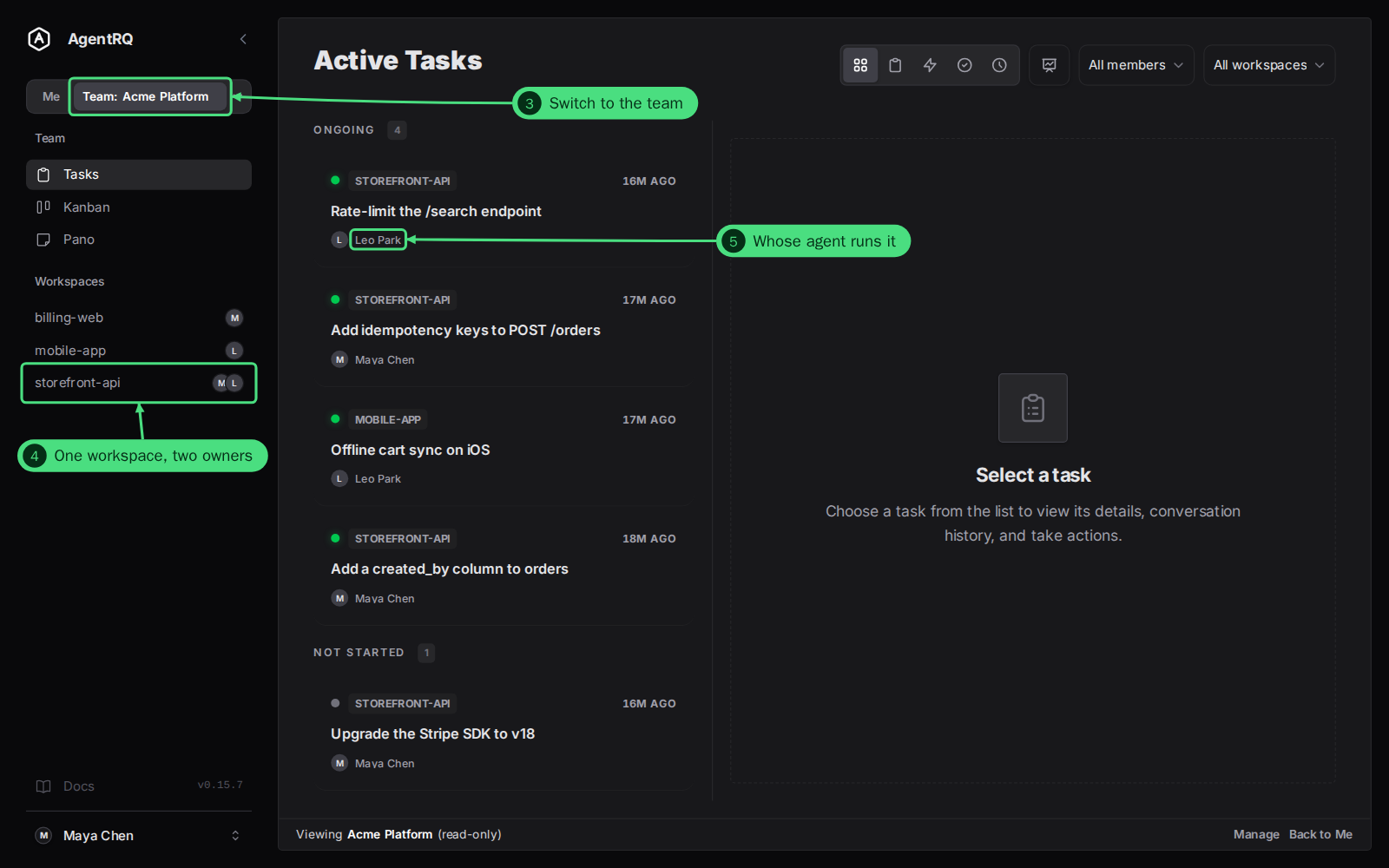
Why it matters. "Which agent is doing what" becomes a page anyone can open, including the engineering manager who doesn't run sessions at all. The team guide walks through it step by step.
Pain 2: Ownership Lives in Standup
The pain. Who owns a task is something people remember, and two sessions end up on the same file.
The fix: one owner per task, written on the card. A task belongs to one workspace and is assigned either to the agent working there or to a person. On the team board each task carries its owner's name. Since AgentRQ v0.17.0 an agent works on one task at a time, so every session has at most one card in Ongoing, and the rest of its work waits in Not Started, already owned.
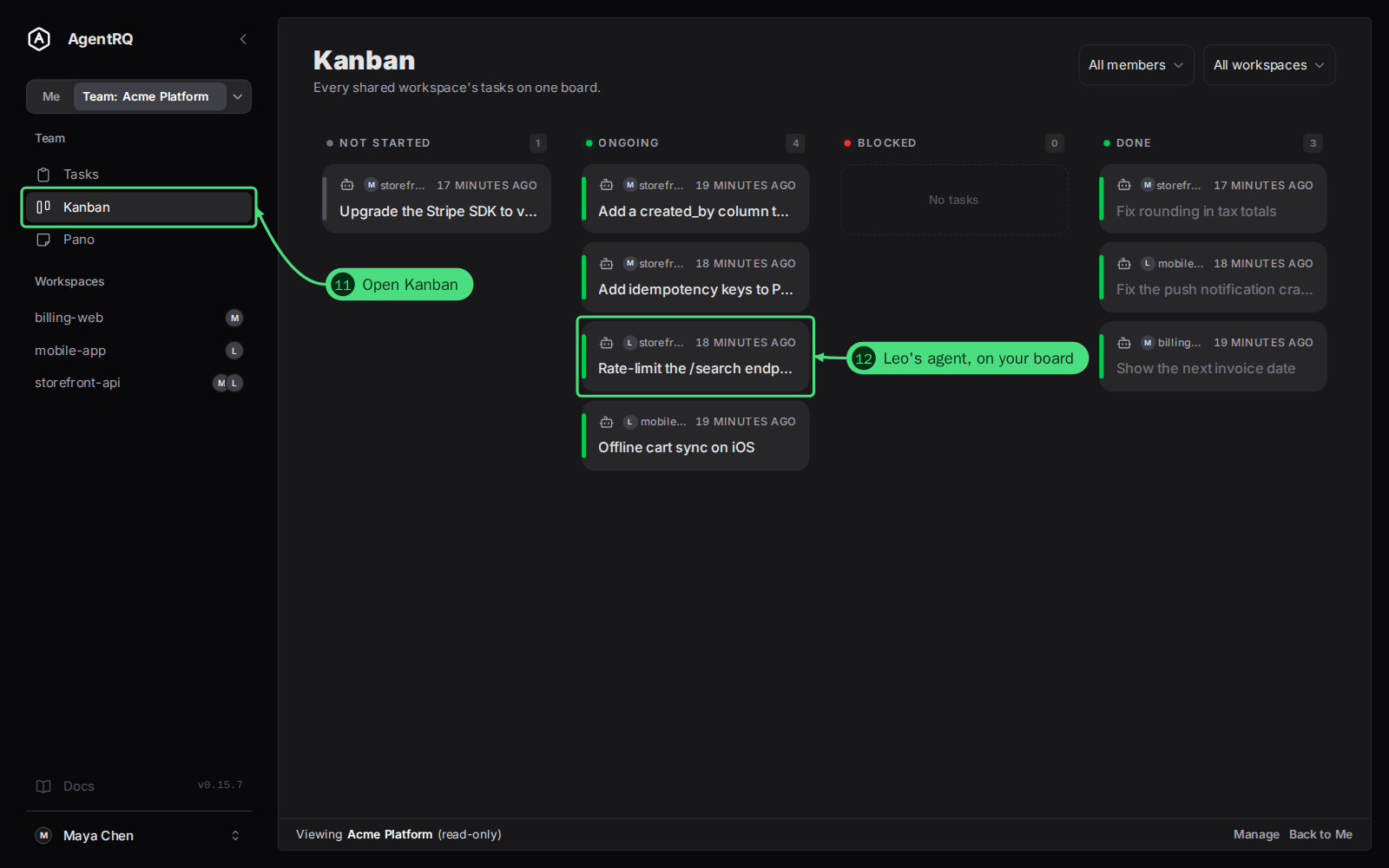
Why it matters. Before you start a session on the cart endpoint, you can see that Leo's session already has it. Duplicate work shows up on the board before it shows up as a merge conflict. Our post on managing coding and research agents goes deeper into roles and ownership.
Pain 3: Prompts Stall in Someone Else's Terminal
The pain. A session asks for permission and waits until its owner looks at that terminal.
The fix: Pending on Me. When Claude Code asks to run a command, the card stays in Ongoing with Allow and Deny on it. When it asks a question, the card moves to Blocked. Pending on Me lists every task waiting on you, across every workspace, and notifications tell you when one arrives. Teams that live in Slack can answer there too, through the Slack integration. Work can come in from Slack, GitHub issues and Jira as well: see assigning coding agents tasks from team chat or an issue tracker.
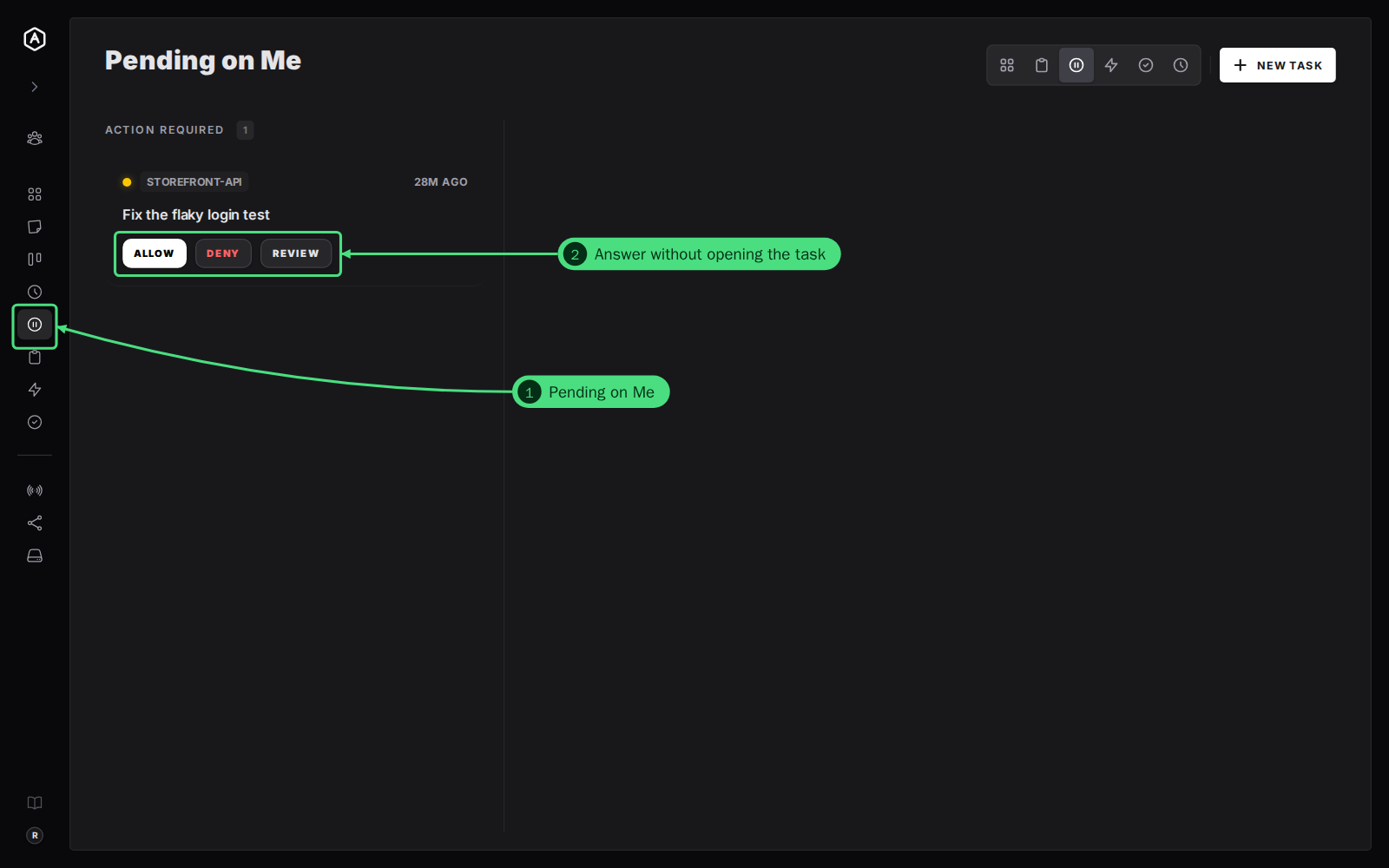
Why it matters. Agent time stops going to waiting. A prompt reaches the person who can answer it, wherever they are, instead of a terminal they aren't watching.
Pain 4: You Can't Tell What a Session Actually Did
The pain. When a teammate's session changed something, the only record is a diff and a scrollback that may be gone.
The fix: a record per task. The task timeline keeps every status change, the conversation keeps every message and approval, and tool call history lists each command the session ran. On a teammate's task, the Trajectory toggle shows their session's steps, and Clone to my workspace copies the task to your own queue. When Claude Code runs on one of your machines, you can open its terminal live in the browser.
Why it matters. "Who approved that migration, and what did the agent run?" has an answer days later, without asking the person who started the session.
Pain 5: Hand-Offs Between People's Agents Get Lost
The pain. One person's session finishes something another person's session should act on, and nobody files the next step.
The fix: events and workflows. A task can publish a named event when it finishes, and another workspace can subscribe to it, so the next task is filed with its owner the moment the first one completes. Workflows draw the whole chain as a graph. A supervisor agent can also split a goal into tasks and file each into the right workspace.
Why it matters. The plan for who picks up what lives in the control plane, not in one person's head, and it still runs when that person is in a meeting.
Pain 6: Shared Knowledge Stays on One Laptop
The pain. One teammate teaches their session how to run the test suite. Everyone else's sessions never learn it.
The fix: shared memory and skills. Each workspace has its own memory and skills, and a team can share them. A teammate's skill can be added to your own workspace as a link, so when their agent improves it, yours gets the change.
Why it matters. A shared view of the work comes with a shared playbook for doing it, so every session on the team gets better together.
An Agent Control Plane Is Also Your AI Agent Task Manager
Many teams search for this as a task manager for AI agents, an agent task board or a task tracker for agents, not a control plane. The words differ but the need is the same: a place where agent tasks live outside the sessions. In AgentRQ the same tasks do all of these jobs:
- → AI agent task board. The Kanban board shows every agent task in Not Started, Ongoing, Blocked or Done, for one workspace, all of yours, or the whole team. It works as a Claude task viewer too: open any card to read the conversation, approvals and tool calls.
- → AI agent task queue. Each agent works one task at a time, and the rest wait in order in Not Started. Queue a day's work in the morning and the agent starts the next task when it finishes the last.
- → Agent task management across workspaces. Every workspace's tasks show on one board, and you can move a task between workspaces with its history intact.
- → Recurring task scheduler and one-time tasks. Task scheduling runs a task once at an exact time or on a cron schedule. See one-time schedules and scheduled cron agents.
- → Autonomous task execution with people in the loop. With YOLO mode an agent works a task end to end; without it, risky commands stop for an Allow or Deny.
- → Task latency. Stats pages chart how long tasks take, from start to close, and how long each one waited on you. See task latency.
- → Start fresh when you switch tasks. Claude Code suggests running /clear between tasks. Clear Context sends /clear before each task, so every task starts on a clean context.
- → Find any task from the keyboard. Cmd/Ctrl+K searches every task, and N files a new one. See keyboard shortcuts.
For what a task tracker for AI agents needs in general, read Task Tracker for AI Agents and Agentic Task Management.
What This Unlocks
Standup gets shorter. "What is your agent working on?" is answered by the board before anyone asks. The meeting moves on to decisions.
More sessions per person without losing control. When every session's work is a card and every prompt reaches you in one list, running five sessions costs about as much attention as running two.
Managers can see agent work without running agents. The team board, member filter and team analytics show progress and throughput to people who never open a terminal.
Mixed agents, one control plane. One teammate can use Claude Code, another Codex, and a research workspace Gemini CLI, all on the same board.
Ownership outlasts the session. Sessions end, laptops close, people go on holiday. The tasks, their owners and their history stay where the team can find them.
Set It Up
- Create a workspace per repository or job. Give each a short Mission Description so its agent knows what it is for.
- Connect Claude Code to each workspace. Start it from the workspace on an enrolled machine, or copy the workspace config and start Claude Code yourself. Claude Code and Machines shows both. On Claude Team or Enterprise, an admin has to enable channels first.
- Create a team and invite your teammates. Add a member to a team covers the invite.
- Share your workspaces with the team. Their tasks appear on the team's list and board with your name on them.
- File work as tasks. Write the job in the workspace that owns it, assign reviews and decisions to a person, and watch Pending on Me for anything waiting on you.
For a closer look at the board itself, see our Claude Code task board post, which also covers task forks and workspace forks for running sessions in parallel.
FAQ
What is an agent control plane?
The layer above your agents that assigns their work, shows what each one is doing, holds their approvals and records what they did. The agents themselves are the data plane. See the glossary entry.
Doesn't Claude Code agent view already do this?
Agent view shows the Claude Code sessions you are running, grouped by state. It is a good view of your own work. A team control plane adds what one machine can't: every teammate's sessions on one board, an owner on each task, approvals routed to the right person, and history kept after the session ends.
How is this different from Claude Code agent teams?
Agent teams split one job among sessions led by one lead session. AgentRQ tracks all of a team's ongoing work, across many jobs, people and machines, and works with agents other than Claude Code. You can still use agent teams inside a session that AgentRQ assigns a task to.
Can a task have more than one owner?
No. A task belongs to one workspace and is assigned to that workspace's agent or to a person. Split shared work into one task per owner and connect them with an event.
Can teammates see each other's tasks without sharing everything?
Yes. Each workspace you share has separate switches for tasks, skills and memory, so you can share the work and keep the rest to yourself.
Do our sessions have to run in the cloud?
No. Claude Code runs wherever it runs today, on laptops or on your own machines. AgentRQ is the control plane those sessions connect to, and you can self-host it.
Can agents run tasks for hours or days at a time?
Yes. A task stays open until its agent or a person closes it, and the agent keeps working on it across messages, approvals and questions. When an agent runs on one of your machines, it keeps working after you close the browser.
Can I sync tasks across multiple workspaces?
Yes. The all-workspaces Kanban board, Pending on Me and the team board each show tasks from every workspace at once. A task can move to another workspace, and events file follow-up tasks in other workspaces automatically.
Can Codex run background tasks from the same board?
Yes. Codex connects through the Codex Gateway, picks up tasks from its workspace and works them while you do something else. Its tasks sit on the same board as Claude Code's.
Does it work with Codex and Gemini CLI too?
Yes. Each workspace can run a different agent, and all of them report to the same board. See Which Coding Agents Support ACP?