Assign Coding Agents Tasks From Slack, GitHub or Jira
Your team already decides what to build in two places: the team chat and the issue tracker. A bug report lands in Slack. A product manager files a Jira ticket. A customer opens a GitHub issue. Then someone has to copy that request into a terminal, start an agent, paste the context and remember to check back. The coding agent is fast. Getting work to it is slow.
That is the question behind this post: which AI coding agents can be assigned tasks from team chat or an issue tracker?
The short answer: many coding agents now take work from one or two of these places, but each vendor connects its own agent to its own short list of tools. If you want any agent you run, Claude Code, Codex, Gemini CLI or another ACP agent, to take tasks from Slack, GitHub, Jira and anything else that can send a webhook, you need a layer in between. AgentRQ is that layer. Its Slack integration creates tasks with /t and settles approvals in the thread, and Hooks turn a GitHub issue, a Jira issue, a failed CI run or any HTTP request into a task in the right workspace, picked up by the agent you connected there.
Which Coding Agents Take Tasks From Chat or a Tracker
This is what each vendor documents as of November 2026. These integrations change fast, so check each vendor's docs before you choose.
| Agent | Team chat | Issue tracker | Where it runs |
|---|---|---|---|
| GitHub Copilot coding agent | Slack and Microsoft Teams, through GitHub's apps | Assign a GitHub issue to Copilot; Jira | GitHub Actions |
| Claude Code | Claude in Slack | @claude in GitHub through Claude Code GitHub Actions; Claude Agent for Jira | Your terminal, or Anthropic's and GitHub's runners |
| Cursor background agents | Slack | Linear, GitHub; Jira | Cursor's cloud |
| Devin | Slack | Linear, Jira | Devin's cloud sandbox |
| Codex | Slack | GitHub; Jira listed as coming | OpenAI's cloud, or your terminal |
| Jira's and Linear's own agents | In the tracker | Assign the issue to the agent | The tracker vendor's cloud |
| Any agent through AgentRQ | Slack: /t creates a task, @agentrq replies, approvals in the thread | GitHub and Jira hooks, plus a generic hook for anything that sends HTTP | Your own machines, a cloud box, or both |
The pattern is clear. Each vendor wires its agent to the places it chose, and runs it in its own cloud. That works well if your whole team uses one agent and one tracker. It works less well when one engineer prefers Claude Code, another Codex, the backlog lives in Jira, bugs arrive as GitHub issues and the alerts come from a CI system nobody integrated.
What to Look For
Before you pick a tool, check five things:
- Any agent, not one vendor's. The tasks should reach the agent your team already runs, and still work the day you add a second one.
- Any source. Slack, GitHub and Jira today, plus a plain webhook for the CI system, the monitoring tool or the internal form you will add next month.
- The right workspace and owner. A GitHub issue in the API repo should land with the agent working in the API repo, not in one shared inbox.
- Approvals where the request came from. If the request came from Slack, the "can I run this migration?" question should be answerable in Slack.
- Your code stays where you choose. Some teams can't send their repository to another vendor's cloud. The agent should be able to run on your own machines.
How AgentRQ Turns Chat and Tracker Requests Into Agent Tasks
Pain 1: Requests in Slack Never Reach the Agent
The pain. Someone reports a bug in Slack, someone else says "I'll get the agent on it", and the request waits until that person is back at a terminal.
The fix: create the task from Slack. Connect a workspace to Slack and AgentRQ makes a private channel for it. Anyone in the channel can file a task with /t, and the workspace's agent picks it up:
Replies go to the agent with @agentrq in the task's thread. When the agent asks to run a command, approve and deny buttons appear in the thread, and the message updates to name whoever decided. Channel members don't need an AgentRQ account.
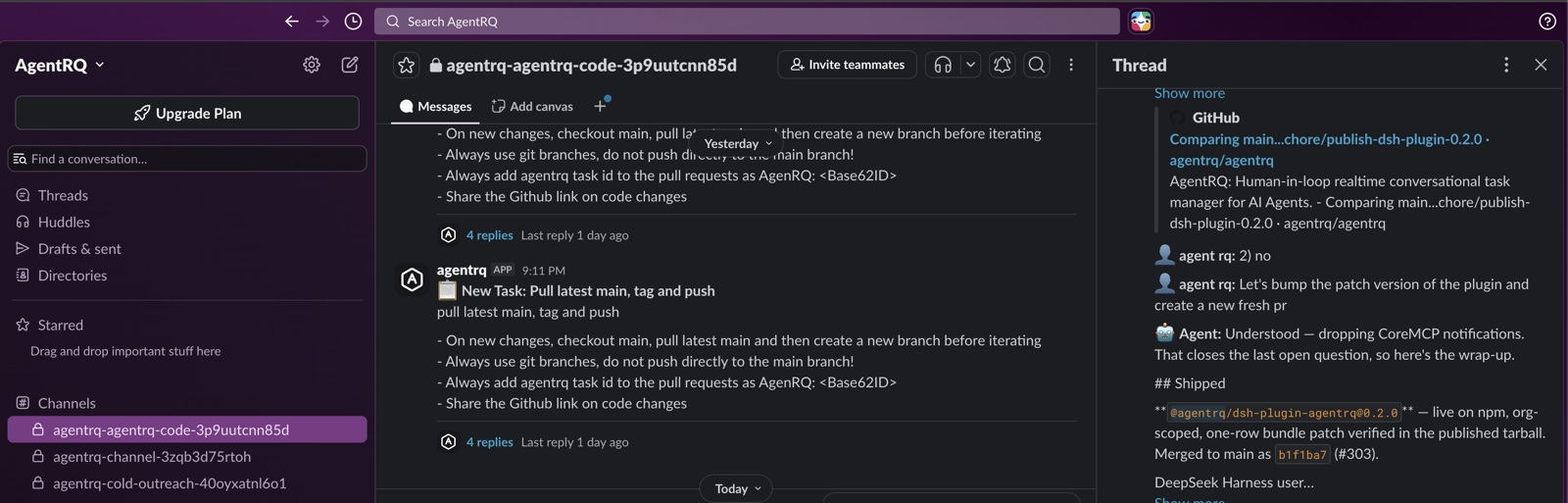
Why it matters. The person who saw the problem can hand it to an agent in the same breath, and the whole team watches it move without leaving the chat. More in Team Collaboration From Slack.
Pain 2: GitHub Issues Pile Up Waiting for Triage
The pain. New issues sit unlabelled until someone has time to read them. Failed CI runs wait for whoever notices the red X.
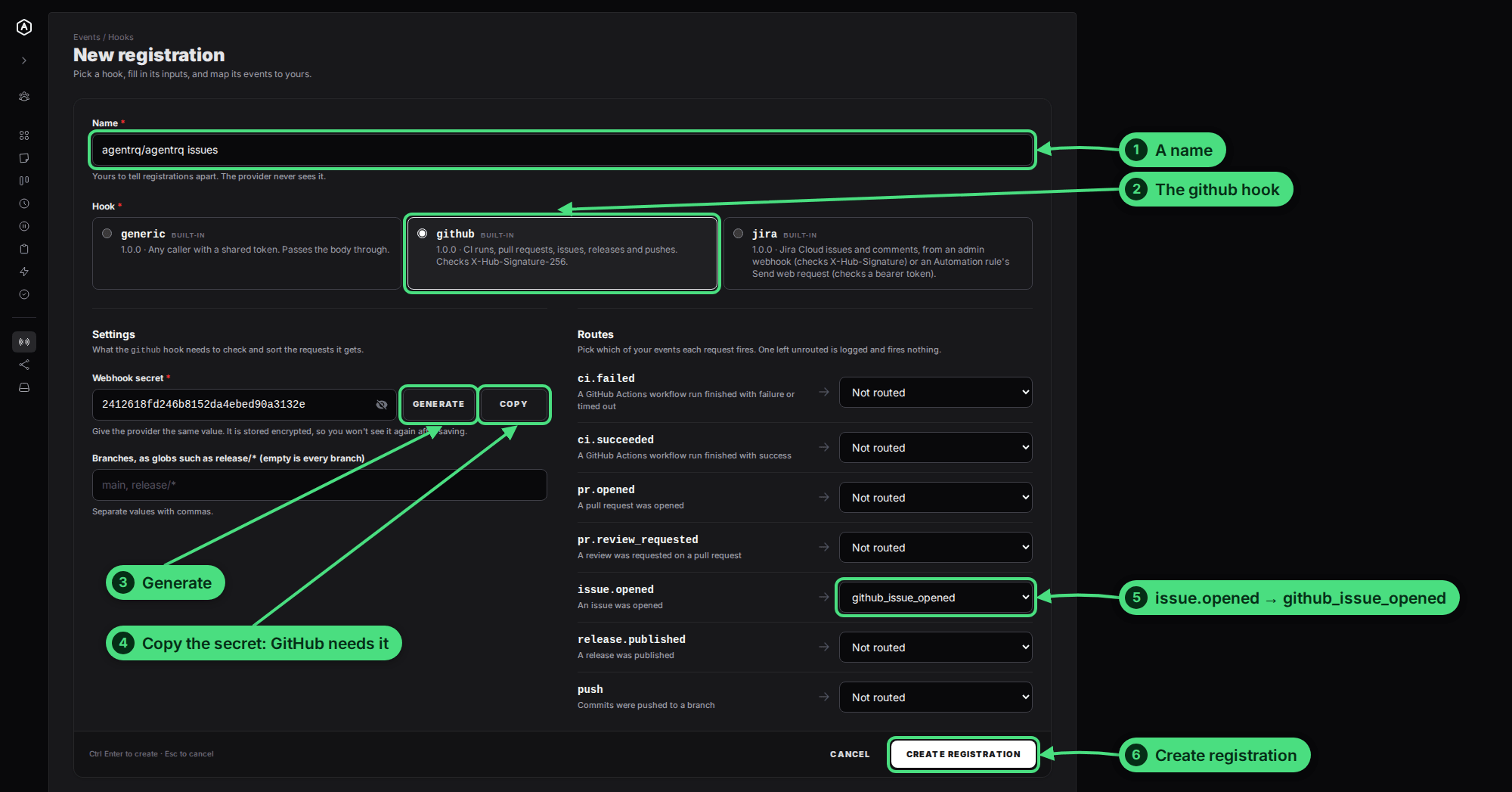
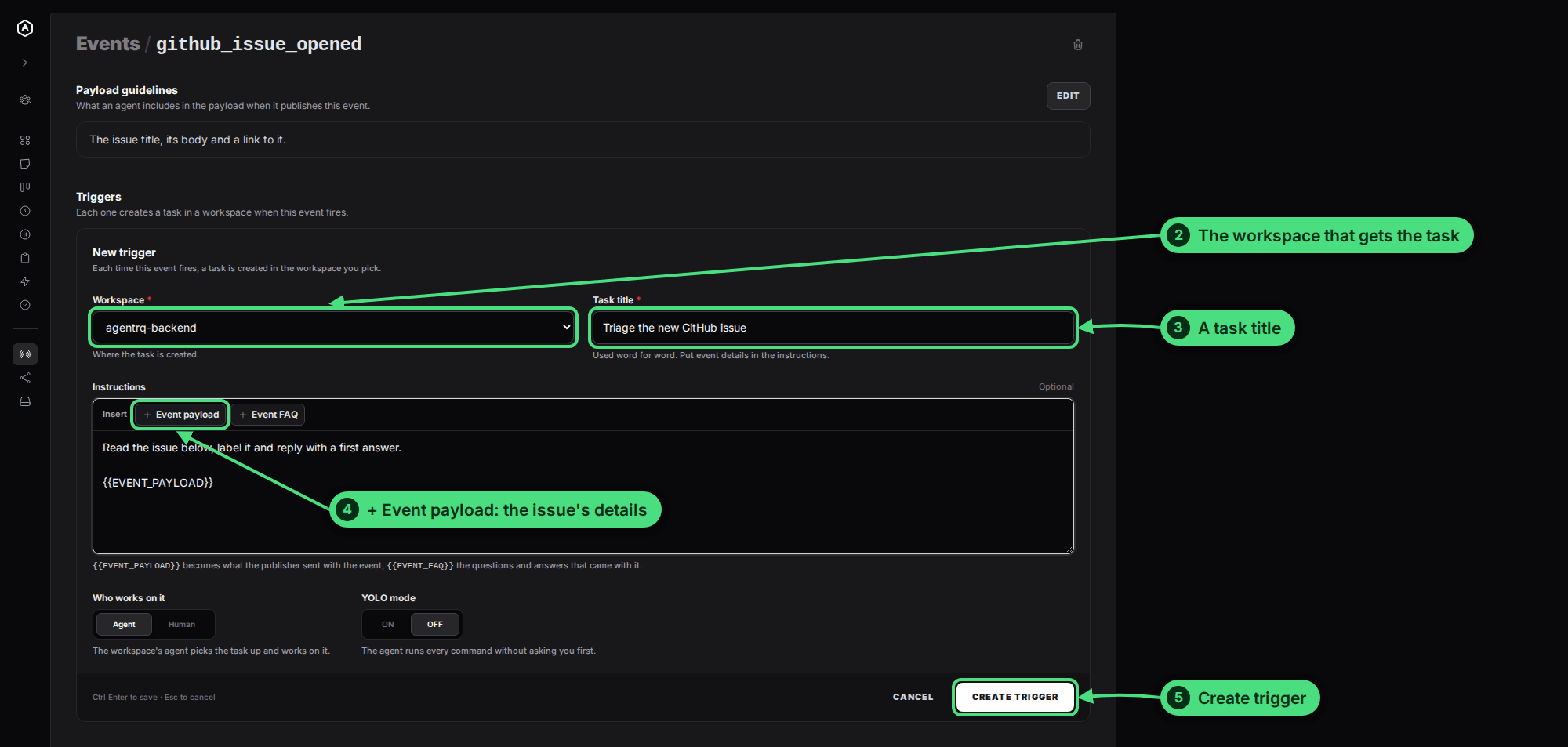
The fix: the github hook. Hooks turn a request from an outside service into one of your account's events, and an event's trigger creates a task. The built-in github hook checks GitHub's signature and fires events for issue.opened, pr.opened, pr.review_requested, ci.failed, ci.succeeded, release.published and push. Route issue.opened to an event whose trigger says "triage this issue" in the API workspace, and every new issue becomes a task for the agent there, with the issue's title, body and link in the instructions.
In GitHub, you add the payload URL and the secret as a repository webhook and tick the events you routed:
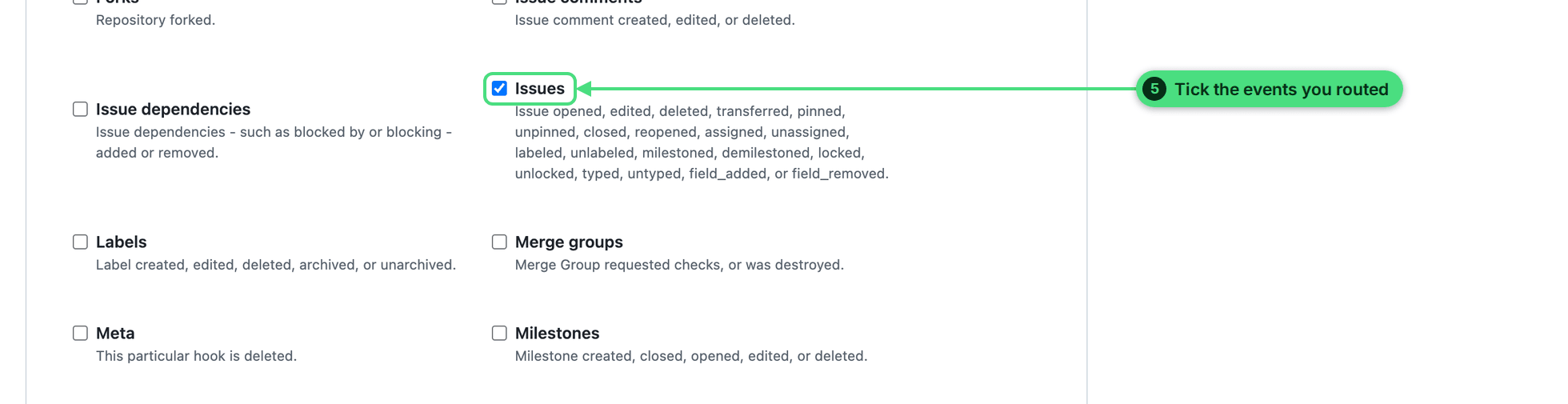
Why it matters. Every issue gets a first answer within minutes, every failed run gets someone looking at it, and Branches can limit CI and pull request events to branches such as main or release/*. The Dependabot alerts post shows three more ways to wire GitHub to an agent, and the GitHub hook guide shows every click.
Pain 3: Jira Tickets Need a Human Copy-Paste
The pain. The backlog is in Jira. To give a ticket to an agent, someone opens it, copies the description into a terminal and loses the link between the two.
The fix: the jira hook. It works two ways. A Jira Automation rule adds Actions → Send to AgentRQ to every issue: open an issue assigned to you, pick it, and a task shows up in your workspace with the issue's key, summary, link and description. Or a Jira admin webhook fires on issue created, issue updated and comment created. Required Assignees and Actors fields limit it to issues assigned to the people you list and changed by them, and Project keys and Labels narrow it further.
Why it matters. The ticket stays the source of truth and the agent gets it with one click, without a second integration per agent. A teammate running the rule on your issue starts nothing, because the hook checks who ran it. The Jira hook guide covers every step in AgentRQ and in Jira.
Pain 4: Every Other Tool Needs Its Own Integration
The pain. The CI system, the monitoring tool, the nightly backup and the internal request form all have something to say to an agent, and none of them has an integration with it.
The fix: the generic hook. Anything that can send an HTTP request with a header can create a task. The generic hook checks a shared token and passes the request body through as the event's payload:
A retry with the same Idempotency-Key is recorded as a duplicate and creates nothing, so a flaky sender never makes two tasks. Each registration's Deliveries list shows every request and what happened to it.
Why it matters. You aren't waiting on any vendor to build the integration you need. If it can call a URL, it can give an agent a task: see start an agent task from any webhook. On a self-hosted server you can also write your own hook as a small WebAssembly program.
Pain 5: Every Source Lands in a Different Place
The pain. Slack requests go to one agent, Jira tickets to another, GitHub issues to a third, and nobody sees all of it in one place.
The fix: one board for every source. Whatever created a task, Slack, GitHub, Jira or a webhook, it lands as a card on the same task board, in the workspace you chose, with an owner. Permission prompts reach you in Pending on Me, in notifications and in Slack. Our post on an agent control plane for teams covers the shared view.
Why it matters. "Where did this task come from, and who is on it?" has one answer, whichever door the request came through.
Pain 6: Automation You Can't Control Is Risky
The pain. An outside service that can start an agent can also start an agent that runs anything.
The fix: secrets, routes and approvals. Every hook needs a secret, the payload URL carries a token that Rotate replaces at once, and an event you leave Not routed is ignored. A route to an event whose trigger has YOLO mode on is marked with a warning. Without YOLO, the agent still stops at every risky command for an Allow or Deny.
Why it matters. You can let GitHub, Jira and Slack hand out work without handing out control of your machines.
What This Unlocks
Requests become work the moment they're made. A Slack message, a new issue or a Jira click starts an agent, so the gap between "someone should look at this" and "an agent is on it" goes from hours to seconds.
Pick the agent for the job, not for its integrations. Claude Code in one workspace and Codex in another take tasks from the same Slack channel and the same Jira project.
Your trackers stay the source of truth. Nobody copies tickets into terminals. The task links back to the issue, and the issue's owner stays in charge.
Your code stays on your machines. The agents run where you run them, on laptops or on your own machines, and AgentRQ only routes the work.
Set It Up
- Connect an agent to a workspace. One workspace per repository is a good start. Connect agents covers Claude Code, Codex and the rest.
- For Slack: link the workspace to Slack in Settings. AgentRQ creates the channel, and you invite your team.
- For GitHub, Jira or a webhook: in Events, create an event and a trigger that files the task in your workspace. Then in Events → Hooks, register the github, jira or generic hook, route its events to yours and copy the payload URL into the service.
- Check Deliveries if a task doesn't appear. The status says whether a request was rejected, ignored or published.
FAQ
Which AI coding agents can be assigned tasks from Slack?
Several vendors connect their own agent to Slack, including Claude, Cursor, Devin and Codex. With AgentRQ, any agent connected to a workspace takes tasks from that workspace's Slack channel through /t.
Can I assign a GitHub issue to Claude Code?
Yes. Route the github hook's issue.opened event to an event whose trigger creates a task in the workspace where Claude Code runs. Claude Code picks the task up as soon as the issue is opened. Claude Code GitHub Actions also lets you mention @claude in an issue or pull request.
Can I send a Jira issue to a coding agent?
Yes. The jira hook adds a Send to AgentRQ action to Jira issues, or listens to Jira webhooks for issues assigned to the people you choose. The task goes to whichever agent works in the target workspace.
What about Linear and other trackers?
Use the generic hook from any tool or automation that can send an HTTP request with an Authorization header, or write your own hook for a provider's signature on a self-hosted server.
Do the agents run in AgentRQ's cloud?
No. AgentRQ routes tasks and holds approvals. The agents run wherever you start them, and you can self-host AgentRQ too.
Where can I read more about Hooks?
The Hooks guidelines walk through GitHub, Jira and the generic hook step by step. See also the Hooks feature page and the Hooks docs.
Can a hook start an agent that runs commands without asking?
Only if you route it to an event whose trigger turns YOLO mode on, and AgentRQ warns you when you do. Otherwise every risky command waits for a person.